 Hemory Team
On this page
When an important detail comes up in a meeting or face-to-face conversation, searching your messaging app may not help: the discussion was never typed there. Notes, transcripts, summaries, and searchable conversation memory can all fill part of that gap, but they preserve and retrieve different amounts of information. Compare them by what they capture, how widely you can search, and how easily you can check the original context.
TL;DR
- Chat history search is useful for written exchanges; it cannot find spoken details that were never added to the chat.
- Notes and summaries are quick to review but depend on what someone chose to record. An isolated transcript keeps more of one conversation but may be hard to search across many discussions.
- Searchable conversation memory is useful when you need to retrieve details across captured conversations. Check what is actually captured, what the search can reach, and how you can review the source.
What each option can help you find
These approaches differ in both their source material and their search scope. A tool’s label alone does not tell you which conversations it can access or how much detail it preserves.
| Approach | What it searches or preserves | Useful when | Main limitation to consider |
|---|---|---|---|
| Chat history search | Messages entered in a chat or messaging app | The discussion happened in that app, or spoken decisions were written there afterward | It will not surface speech that was never captured in the text thread |
| Personal or meeting notes | The points a person chose to write down | You need a concise reminder or a short record of a specific discussion | Details omitted during note-taking may not be recoverable from the notes |
| An isolated transcript | The words recorded in one conversation, if transcription is available | You need to review a particular discussion in detail | One transcript may not be easy to search alongside other sessions; transcription can also contain errors or omissions |
| Meeting summary | Selected topics, decisions, or actions from a meeting | You want a quick overview of a formal meeting | The summary may leave out wording, explanations, or conditions that matter later |
| Searchable conversation memory | Captured conversations organized for retrieval across sessions | You need to recall details from multiple discussions over time | It can only retrieve from conversations that were captured and are accessible; a result still needs context and judgment |
These are categories, not guarantees about every product. Some tools combine notes, transcripts, summaries, and search. Assess what a particular option does in the situations you care about rather than assuming its name describes its full capabilities.
How to evaluate a way to search spoken conversations
1. Check what gets captured
Start with the discussions you want to find later: formal meetings, quick in-person conversations, or calls. Find out whether the tool can capture those situations on your devices and in your workflow. A product that records meetings may not support every kind of call or face-to-face setup.
Also consider what happens when a conversation is not captured. No search method can retrieve an exchange that was never recorded or written down. For future conversations, check how recording starts and stops, what participation or consent is required, and whether the process fits the setting.
2. Compare the record with the amount of detail you need
A note or summary can be easier to scan, while a transcript may preserve more of the conversation’s wording. Neither format is automatically complete or authoritative. If a decision depends on a condition, exact phrasing, or who said what, see whether you can review the relevant source rather than relying only on a shortened summary.
For example, a note might say, “Consider moving the launch.” The conversation may also have included a condition that would change that recommendation. If that condition matters, a brief summary alone may not be enough.
3. Find out whether search works across conversations
Searching one transcript answers a different need from asking a question across sessions. If you often need to find a detail from an earlier discussion without remembering which meeting it came from, cross-session retrieval may matter more than a polished summary of each individual meeting.
Test with the clues you are likely to remember—not only exact phrases. You may recall a project, topic, or person but not the date or wording. Check what the tool returns, what source material you can inspect, and whether it makes clear when a result is uncertain or incomplete. A failed search does not prove that the discussion never happened.
4. Treat speaker labels as clues, not proof
If knowing who spoke matters, check whether the record distinguishes speakers and how uncertain identifications are shown. A label can help you navigate a conversation, but it does not by itself prove that a person accepted a task or made a commitment. Use the surrounding exchange and your knowledge of the decision process before acting on a consequential attribution.
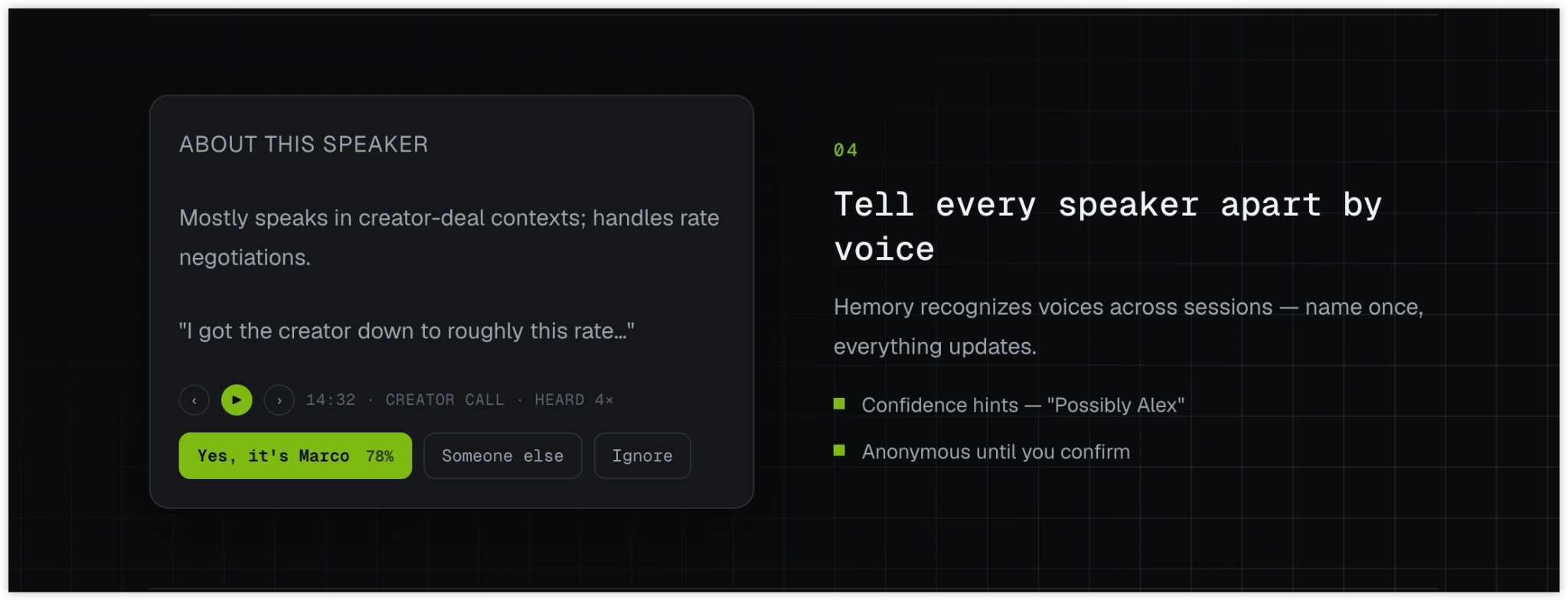
5. Check the source in proportion to the decision
For a low-stakes reminder, a concise note may be enough. For an important commitment or disputed detail, inspect the relevant transcript lines or another current record when available. Consider whether the wording, speaker, conditions, and current status are clear. Do not assume that a later mention automatically changes an earlier agreement.
Where searchable conversation memory fits
If the conversations you need have already been captured in Hemory, its Memory can be queried across sessions. Hemory describes listening sessions as producing timestamped transcripts with Speaker labels, and its built-in Q&A supports questions about Memory and retrieval across different conversation sessions. Transcript lines can be played back on the listening device, which can help when you need to review the surrounding exchange.
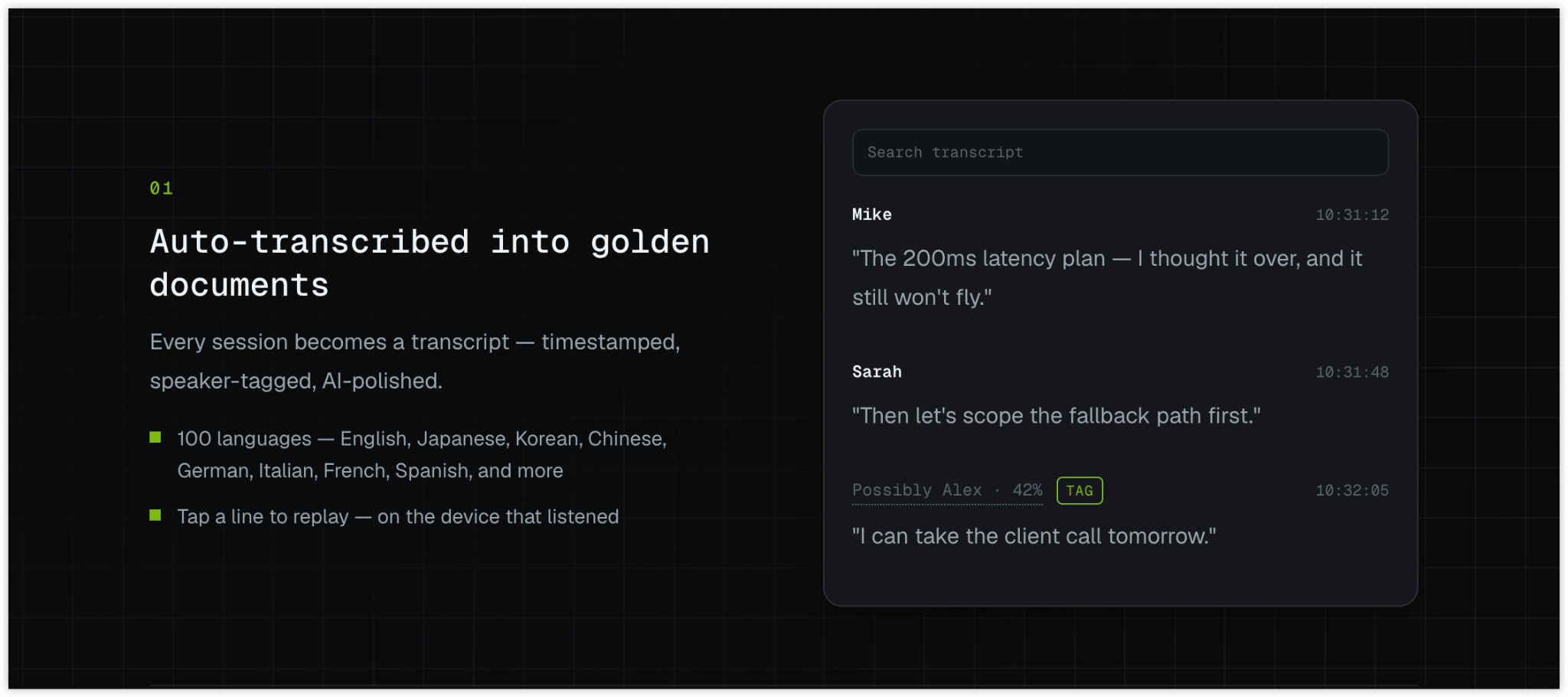
That makes searchable conversation memory a possible fit when the information is spread across captured discussions and you do not want to rely only on a short note or a manually supplied recap. It does not make the record complete, guarantee a correct transcription, or recover uncaptured conversations. For a detail with consequences, use the retrieved context to find and assess the relevant source rather than treating a short answer as proof.
If your existing CRM, notes, or transcript archive already makes the needed discussions easy to find and review, it may be sufficient. The practical question is whether you can retrieve the right detail across the sources and conversations you actually use—and check its context when that matters.
Choose by the work you need to do
- Choose chat search when the information is already in written threads and searching those threads covers the task.
- Choose notes or summaries when a concise record is enough and someone can reliably capture the points that matter.
- Choose isolated transcripts when you need detailed review of particular conversations and can locate each recording or transcript.
- Consider searchable conversation memory when you need to find details across multiple captured spoken discussions, especially when you may not remember which session contains them.
Before deciding, try a representative retrieval task: look for a detail you would realistically need later, then see whether the tool finds an understandable source you can review. If a crucial conversation was not captured, use another record or ask a focused follow-up instead.
FAQ
Can searchable conversation memory find a conversation that was never recorded?
No. It can only retrieve information from captured conversations it can access. If the discussion was not recorded or otherwise documented, check another source or ask someone involved.
Is a transcript the same as searchable conversation memory?
No. A transcript is a record of a particular conversation. Searchable conversation memory is intended to help retrieve information across captured sessions; the underlying records may still be transcripts, notes, summaries, or a combination, depending on the tool.
Should I stop using chat history search?
Not if written messages remain useful. Chat search and spoken-conversation search cover different sources, so you may use both when important information is spread across text threads and spoken discussions.
When a spoken detail matters, start with the source you already have. If the record is scattered across conversations, compare options by capture coverage, cross-session retrieval, and the ability to review context—not by the word “search” in a product description alone.