 Hemory Team
On this page
Hemory is an app that records conversations on your phone or watch and gives AI context from your real life. It turns those conversations into searchable memory that connected AI tools can use, so you can ask questions and keep working without first moving files between tools or retelling the discussion.
TL;DR
- Give AI the background from your conversations. Customer interviews, meetings, informal discussions, and spoken ideas can become context for questions and tasks.
- Use the phone or watch you already have. Hemory connects recording, transcription, and organization with your AI tools, without requiring a dedicated recorder.
- Spend less time preparing context for AI. You choose when to record; Hemory handles the initial transcription and organization.
- Build on discussions over time. Ask about one conversation or let a connected agent retrieve relevant material across sessions to help draft a brief, write a report, or prepare for a decision.
Why AI needs context from your real-world conversations
An AI assistant can help write a proposal, draft product requirements, or prepare a meeting brief. To make that work specific to your situation, it needs the background: what the customer asked for, why the team rejected an option, or what someone agreed to and under what conditions.
Much of that information is spoken. A client explains a constraint in an interview. Someone raises a concern during a product review. A quick follow-up changes how you understand the plan. Those details may never reach a document or an AI chat.
You can supply the background yourself, but that often becomes a task of its own. Before asking AI for help, you have to remember what happened, find your notes, select relevant passages, and explain how the discussions fit together. A carefully written prompt cannot supply a detail you no longer remember.
Hemory captures these conversations and makes them available for later use. The AI you work with can draw on what was discussed before you opened the chat or editor. You can focus your request on the question you want answered or the work you want done, instead of first reconstructing the conversation.
The same memory is available to you directly. You can revisit a summary, find a passage, or ask Hemory’s built-in Q&A agent about something you heard.
How Hemory makes conversation context easier to use
It is already possible to record a discussion, transcribe it, save the text, and upload it to an AI assistant. Hemory brings those steps together so you spend less time preparing conversations for AI.
That difference matters over time. You might prepare a transcript immediately after an important client meeting. After a routine discussion with no immediate follow-up, it is easier to put the work off. A few weeks later, when an idea or explanation becomes relevant, you may have an unprocessed recording—or no useful record at all.
The difficult part is keeping up the habit when you do not yet know whether the information will be useful.
| Part of the process | Work you might otherwise do | How Hemory helps |
|---|---|---|
| Capture | Set up a separate recorder or juggle recording tools | Record with a supported phone or watch |
| Prepare the record | Move the recording into a transcription tool and organize the output | Generate a transcript and organize the conversation into activities and summaries |
| Give AI background | Find files, select passages, and paste or upload them for each task | Let a connected agent retrieve relevant conversations |
| Return to an older topic | Reassemble information from several discussions | Search and ask questions across captured sessions |
You choose what to record and how to use it. Hemory handles the transcription and initial organization, then makes the relevant material available when you need it.
A conversation can have future value even when you do not need to produce anything from it right away. Once you have chosen to capture it, you can leave the initial processing to Hemory and return when there is a reason to use the information. You do not have to decide during the discussion which sentence will matter next month.
How Hemory turns conversations into context for AI
Capture with the devices you already use
Hemory runs on supported phones and watches, so you can begin without buying a dedicated recording device. Apple Watch can capture and upload listening sessions independently of your phone.
You control when it listens. Manual Mode lets you start and stop recording yourself. Schedule Mode lets you set listening hours and receive reminders to start or stop with one tap.
You might record a customer interview, a work discussion, a brainstorming session, or a voice note to yourself. Once recording has started, you can stay involved in the conversation with less pressure to write down every useful detail.
Let Hemory turn the discussion into searchable memory
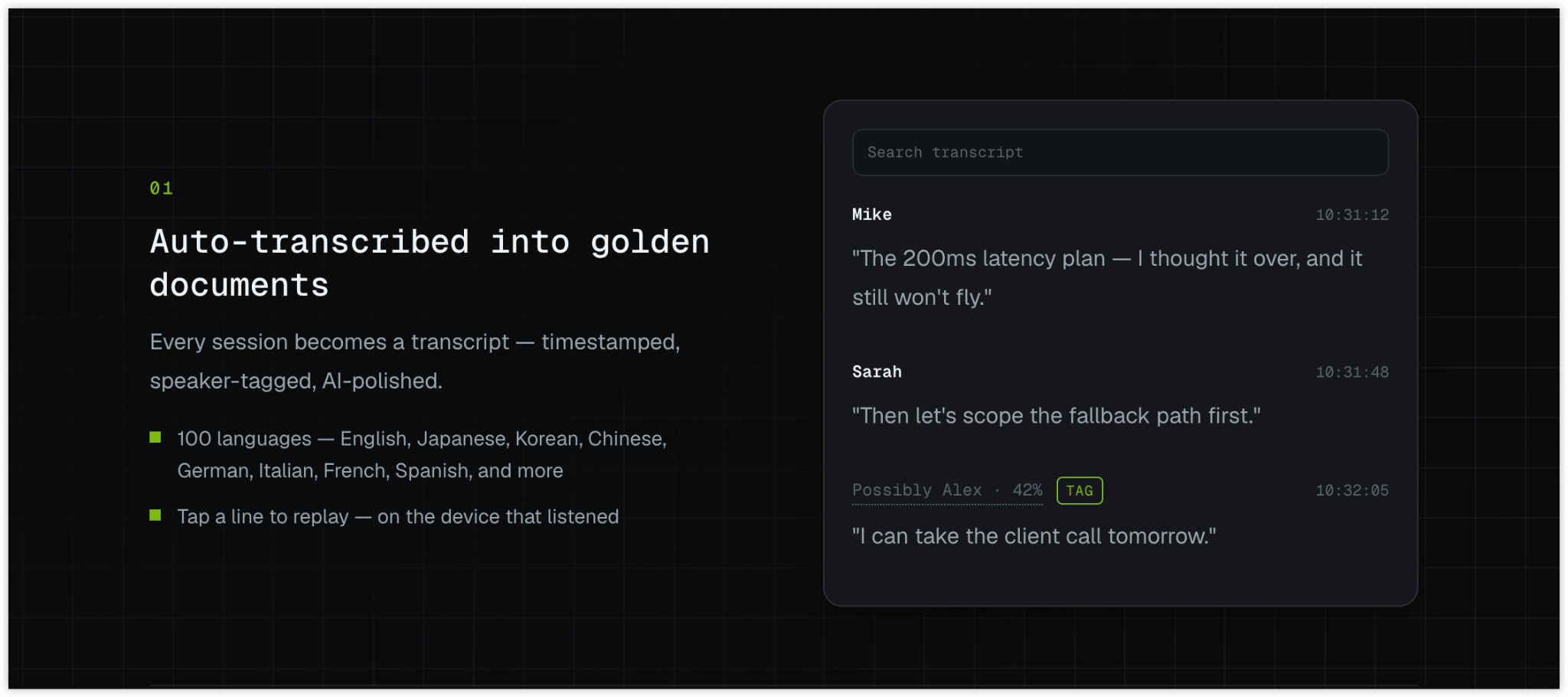
Each listening session becomes a timestamped transcript with speaker labels. Hemory organizes conversations into activities on a timeline and creates summaries suited to the content. A meeting can produce structured notes with topics, decisions, and action items; an informal exchange can have a lighter record.
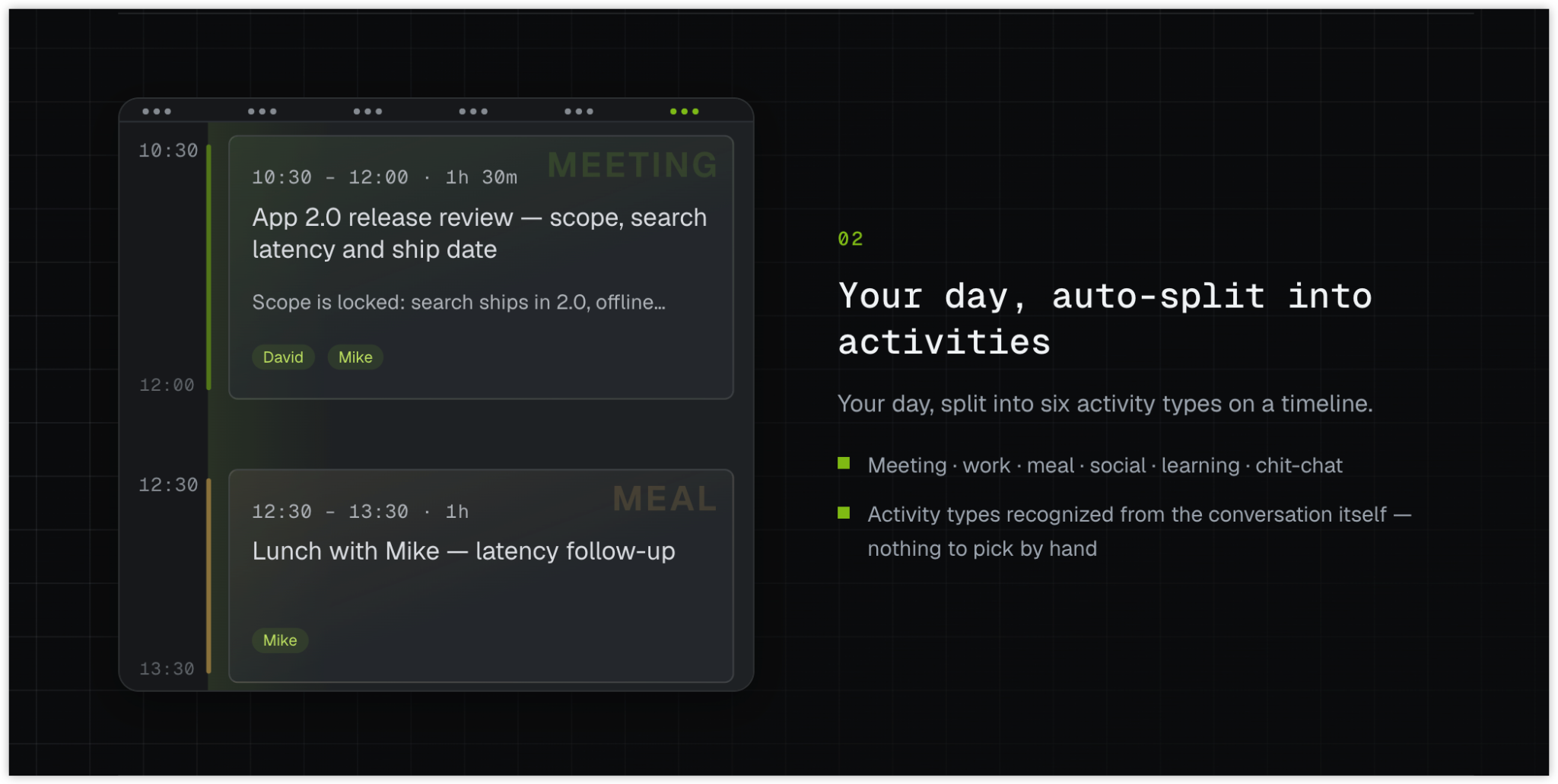
In Hemory, searchable memory combines transcripts with summaries, activities, and speaker information. You can skim a summary for the overview or retrieve details from the transcript when a new question comes up.
You do not need to write a separate summary of every discussion before it becomes useful.
Ask a question or give your AI a task
To ask about a past conversation, you can use Hemory’s built-in Q&A agent. It supports follow-up questions and retrieval across sessions. You might ask what was said about a launch date, then ask how a later discussion changed the plan.
For a broader task, connect Hemory to a supported AI tool. Hemory has a ChatGPT connection for bringing past conversations into a chat. It also supports MCP, the Model Context Protocol, through which compatible tools such as Claude Code, Codex, and Cursor can access conversation memory.
Once connected, the agent can retrieve relevant discussions as part of your request. You do not have to manually assemble all the excerpts before asking it to begin.
Hemory provides the captured context; the external agent uses it to analyze the discussion, draft documents, or carry out other tasks it supports. That makes your conversations useful in the AI environment where you already work.
How past conversations help with your next task
A discussion can answer a question today and support a different task weeks later. Keeping the underlying context available lets you ask new questions of the same material.
Consider a product team exploring an onboarding problem. Customer interviews describe where people get stuck. An internal brainstorming session explores possible solutions. A later review raises a dependency that changes what the team can deliver.
When you need a requirements brief, you can ask a connected agent:
Use my Hemory memory to find our recent customer interviews about onboarding and the related product discussions. Draft a requirements brief covering the customer problems, options we considered, decisions made, and unresolved questions. Keep customer requests separate from team decisions, and include any later changes discussed.
The agent can bring together customer evidence, the team’s reasoning, and subsequent changes in one brief, without requiring you to recap each meeting. You review the brief and add anything that happened outside the captured conversations, such as a new priority.
Before the next review, the same material can serve another purpose:
What have we already discussed about this problem, and what still needs a decision?
That gives you a starting point for the next discussion. Earlier ideas and objections remain available, including details left out of earlier summaries.
The same approach applies to other situations:
| When you need help | Conversation context the AI can use | A possible result |
|---|---|---|
| Prepare for a client follow-up | Previous concerns, conditions, and commitments | A brief or draft response that addresses the actual discussion |
| Review a month of work | Project conversations spread across the month | A report draft that connects progress with the reasons behind changes |
| Develop a spoken idea | Voice notes and related brainstorming | An outline that builds on the thinking you have already captured |
| Reflect on your day | Personal voice notes and conversations you chose to record | A journal draft based on those experiences |
As your conversation history grows, you have more background to draw on for later tasks. You can use the relevant material when a question arises without reading and organizing the entire history yourself.
FAQ
Is Hemory a voice recorder or an AI meeting-notes app?
Recording, transcription, and meeting notes are part of Hemory. They create the searchable conversation memory that you and connected AI tools can use later. Its central value is making real-world discussion available as context for AI, while reducing the manual work needed to capture, prepare, and retrieve that context.
Can I use Hemory outside formal meetings?
Yes. Customer interviews, brainstorming, informal work conversations, learning discussions, and personal voice notes can all provide useful context. Hemory adapts its summaries to the activity, so a casual exchange does not need to become formal meeting minutes.
Do I control when Hemory records?
Yes. You can start and stop listening manually, or use scheduled reminders to start and stop with one tap. Choose conversations that are appropriate to record and make sure the people involved are comfortable with being recorded.
Where is the original audio kept?
Raw audio stays on the device that did the listening and is not synced across devices. Audio is processed as a stream and destroyed when processing ends; it is not stored in the cloud. Transcripts and organized memory are separate from raw audio. See Hemory’s privacy policy for how those data are handled.
Give your next AI task the context of a real conversation
Start with a discussion that matters to you. Record it on a supported phone or watch and let Hemory transcribe and organize it.
Then connect your AI tool and ask a question you actually want answered, or request a draft that uses the discussion. You can get started with less work to bring AI up to speed.
Explore Hemory and put your real-world conversations to work with AI.