 Hemory Team
On this page
Searchable memory turns captured conversations into organized records you can retrieve with a question or a few clues. It brings relevant details back into view, so you or a connected AI agent can use them without first replaying recordings, opening notes one by one, or reconstructing the discussion.
TL;DR
- Capture, transcribe, organize, retrieve, and use. These stages turn a spoken discussion into context that remains useful after the conversation ends.
- Start with what you remember. A topic, person, approximate time, or rough description can help you find a discussion without knowing the filename or exact wording.
- Go beyond the original summary. The transcript can retain conditions, explanations, and ideas that were left out of a short recap.
- Bring the context into the next task. In Hemory, you can ask about captured conversations across sessions or let a connected AI agent retrieve background for a plan, brief, or follow-up.
What searchable memory means
Searchable memory is a collection of recorded conversations that you can search and ask questions about over time. It combines the content of a discussion with information that helps you locate and understand it, such as timestamps, speaker labels, activities, and summaries.
Suppose someone explained why an export feature had to wait for a permissions change. A few weeks later, you remember the dependency but not the meeting where it came up. You need the condition for a project plan.
With searchable memory, you can begin with that fragment: “What did we say about the permissions change holding up export?” You do not have to identify the meeting before asking about it.
Three things make this possible:
- A record of the discussion. The spoken information has been captured and preserved.
- Organization that keeps context attached. Time, people, and surrounding discussion help distinguish one exchange from another.
- A way to retrieve relevant content. Search or a Q&A agent brings back material related to your question.
Hemory connects these parts for conversations you choose to record. Its value is in reducing the work between hearing something, finding it again, and using it—with your own judgment or with help from AI.
How it works: from a conversation to usable context
1. Capture creates the source record
Recording creates the source that can be used later. This is also where the first practical benefit appears: you can focus on listening, asking questions, and thinking without trying to turn every useful sentence into a note.
You rarely know which detail will matter later. The reason a team rejected an option may become relevant only when the idea comes up again. Capturing the discussion preserves more of that background than a note written solely for today’s follow-up.
In Hemory, you can record with a supported phone or watch and control when listening starts and stops. You choose the conversations to capture; you do not need to predict every question you might eventually ask.
2. Transcription makes speech searchable
Transcription converts the recording into text that can be searched and used in an answer. Timestamps preserve the sequence of the discussion, and speaker labels help show who said what.
The transcript matters because a later question may require something the summary left out. “Export is delayed” is a useful recap. The surrounding discussion may explain the dependency, the alternative the team considered, and the condition for proceeding.
Hemory creates timestamped transcripts with speaker labels from listening sessions.
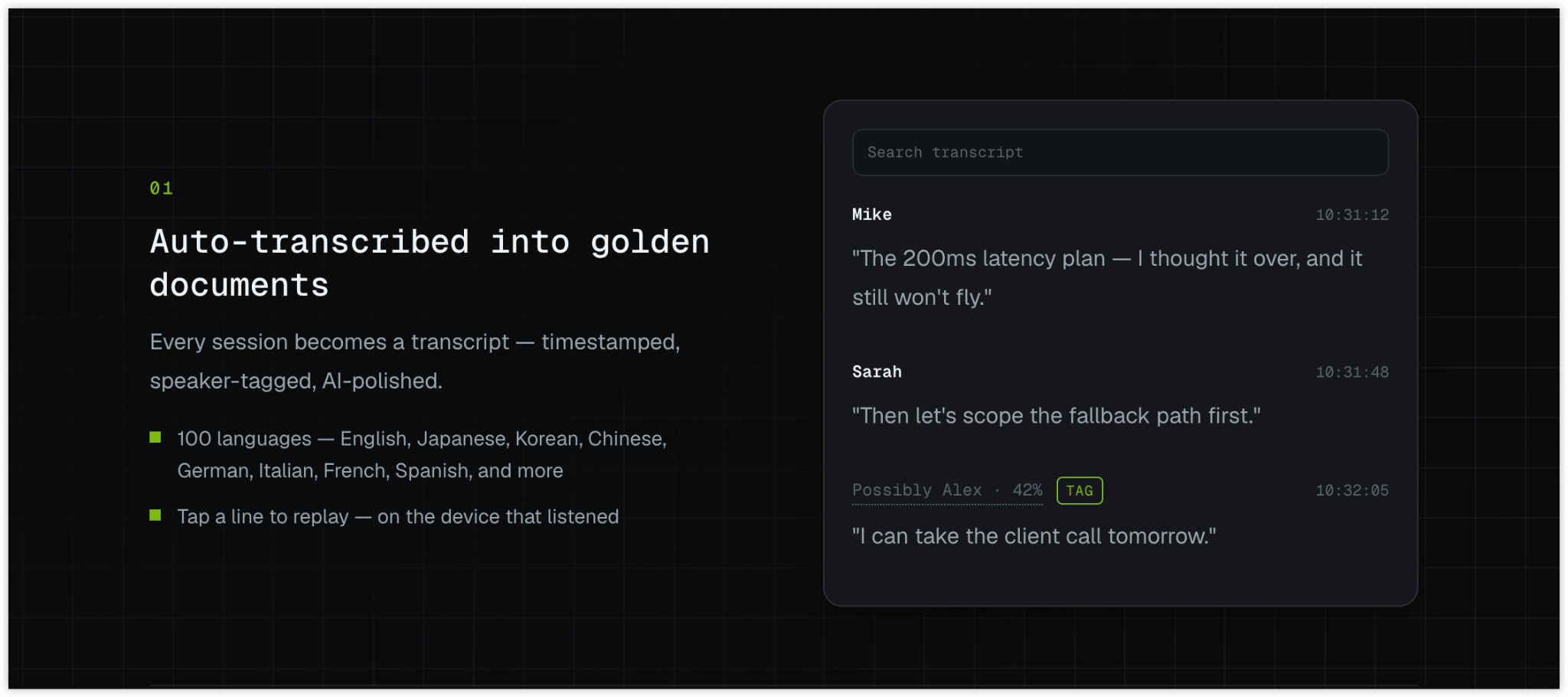
A transcript is a text record of the speech, so a disputed name, number, or technical term may still need a quick check. When needed, Hemory lets you replay a transcript line on the device that recorded it.
3. Organization adds ways to navigate the record
Organization gives you more ways to return to a discussion:
- Time helps distinguish an early proposal from a later decision.
- People help connect related exchanges involving the same speaker.
- Activities group conversations into recognizable parts of the day.
- Summaries give you an overview before you need the detail.
Hemory automatically organizes captured content into activities on a timeline and creates summaries suited to the activity. A meeting can have structured notes with topics, decisions, and action items; a casual exchange can have a lighter record. You do not have to sort and summarize each recording yourself.
Hemory also supports speaker recognition across sessions. Confirmed names help connect a person’s contributions over time, while uncertain matches are presented as suggestions.
These details make the record navigable. They can also help you recognize the right conversation even when your first recollection was incomplete.
4. Retrieval locates the relevant discussion
Retrieval finds recorded material relevant to a question. A topic, speaker, approximate time, or phrase can help locate the right passages across sessions.
Locating passages and answering a question are related but distinct jobs. A text search may look for words or phrases; a Q&A agent can work with the retrieved material to explain what was discussed. You can phrase the question in your own words; the search still needs to locate supporting passages in the recorded content.
For example, you might remember “permissions,” while a discussion used “access control.” Alternative wording can help if a search misses the exchange. A person or approximate time provides another route into the same conversation.
The result of retrieval is relevant source material. The surrounding lines, speaker labels, and timing help establish what each passage means.
5. Q&A turns retrieved material into an answer
An answer brings together the parts of the record that address your question. Hemory’s built-in Q&A agent supports questions and follow-ups across captured sessions.
You might ask:
What did we discuss about delaying the export feature?
Then:
Was the permissions change agreed as a dependency, or was it only raised as a concern?
The first answer restores the background; the second uses that context to address a more precise question. When the distinction affects a delivery commitment, the relevant transcript passage is available to check.
A connected external AI agent can also retrieve Hemory memory while drafting or analyzing. Hemory supplies the recorded context, and the agent uses it in the task. Retrieval can therefore happen as part of the work, without requiring you to assemble a separate background document first.
How searchable memory differs from files, chat history, and summaries
The main difference is how you reach the information. A searchable conversation record lets you work from clues about what was discussed, even when you cannot immediately identify the recording or meeting.
| Method | Where you start | What it helps with | What you may still need |
|---|---|---|---|
| Your own recollection | The parts you remember | Recovering the broad picture quickly | The exact condition, wording, or sequence |
| Opening notes one by one | A guess about the meeting or document | Finding information in a known record | Time to inspect several files when the location is unclear |
| Browsing a chat thread | The channel or exchange | Revisiting information posted there | A record of spoken discussions that never entered that thread |
| Keyword search across transcripts | Words or phrases you remember | Locating specific terms across records | Alternative wording and surrounding context |
| Meeting summaries | The main points from a discussion | Getting an overview quickly | Detail omitted from the summary or spread across other conversations |
| Searchable conversation memory | A question or partial clues | Retrieving and connecting relevant discussion across sessions | The current task, plus any newer information outside the record |
These methods can work together. If the current decision is already clear in a project document, use it. Searchable memory is particularly useful when you need the spoken background behind that decision or cannot remember which conversation contains it.
A summary and a transcript also serve different purposes. You can share a concise update today while preserving enough detail to answer a different question next month.
How the stages work together
The export example shows how the same record can support a question weeks later. Suppose a recorded review included this proposal:
“Let’s hold CSV export until the permissions change is in place.”
A later follow-up confirmed:
“Yes, keep that dependency in the plan. We shouldn’t release export before the permissions change.”
Capture preserves both exchanges. Transcription makes their wording available as text. Session times and surrounding discussion distinguish the proposal from the later confirmation. Retrieval locates the relevant passages, and Q&A can explain the relationship between them.
The resulting answer is:
CSV export depends on the permissions change being in place before release.
You can use that condition in the plan without replaying both conversations. Whether the permissions work has since been completed is a separate question for a later record or the current project status.
This is what makes the whole process useful: the original discussion remains available, while each new question determines which part of it to bring back.
FAQ
Is searchable memory just a folder of transcripts?
Transcripts provide the underlying record. Searchable memory adds organization and retrieval across conversations, so you can start from a question rather than opening files one by one. Hemory combines transcripts, activity-based organization, and Q&A for this purpose.
Do I need to remember the exact words or date?
No. Start with a topic, person, approximate time, or rough description. The answer may restore enough context for a more specific follow-up. If a term does not find the exchange, try another way the same idea might have been expressed.
Can it recover a detail missing from the meeting summary?
Yes, if the detail is present in the captured transcript. A summary selects the main points; retrieval can return to the underlying discussion when you need a condition, explanation, or side remark that was left out.
What if a search returns no useful result?
An empty result alone does not explain why. Try a broader time range or different wording, and check whether the conversation was captured in the source you are searching. If it was not recorded, use another available record or ask someone who was there.
Start with the question you need answered
The next time you think “we discussed this somewhere,” describe what you remember instead of opening notes at random. Let the retrieved discussion restore the background, then use it in your current task or ask a connected agent to help.
Explore Hemory to capture conversations while you take part and make that context available when you need it.