

 Hemory Team
On this page
Choosing how to capture speech depends on what you want to remember. A voice note is usually for your own thought; AI voice mode is a spoken exchange with an assistant; conversation memory is for preserving real discussions so you can find details later. Compare what each approach captures, how you will retrieve it, and what its privacy statements actually cover.
TL;DR
- Use a voice note for a quick thought or reminder that you mainly need to revisit yourself.
- Use AI voice mode when you want to talk with an assistant now. Check whether the product saves the exchange and makes it searchable later; voice input alone does not guarantee that.
- Choose searchable conversation memory when details from discussions may matter after the conversation. It can reduce selective note-taking and make captured material easier to retrieve, but it cannot recover an exchange that was never recorded.
- Compare privacy statements by data type—raw audio, transcripts, summaries, and other stored information—not by a single broad claim.
Three approaches, three different jobs
A dedicated voice note app captures a spoken note you make yourself. It suits quick reminders, ideas, and personal reflections. Whether it stores audio, creates a transcript, or adds search and summaries depends on the app.
AI chat voice mode lets you speak with an assistant instead of typing. Its main purpose is the exchange: asking a question, exploring an idea, or working through a task. Whether the conversation is retained and available for later search varies by product and settings.
A listening session that builds searchable conversation memory is designed to preserve real-world discussions for later use. Rather than selecting and dictating only the details you expect to need, you capture a conversation and retrieve relevant information afterward. The usefulness of this approach depends on the discussion having been captured and being accessible through the product.
| Approach | Best fit | What to find out before choosing |
|---|---|---|
| Dedicated voice note app | Personal thoughts, reminders, and short spoken notes | Does it keep audio, create a transcript, or offer search? How are notes organized and protected? |
| AI chat voice mode | A spoken exchange with an assistant in the moment | Is the exchange saved? Can you return to it or search across conversations? What data is retained and under what settings? |
| Searchable conversation memory | Details from real discussions that may matter later | How does it capture and organize conversations? Can you retrieve information across sessions? What privacy boundaries apply to each stored data type? |
These are categories, not guarantees about every app. Some products combine features; check the specific product’s current documentation and settings rather than assuming that a category tells you what is stored.
Compare the approaches against your needs
Capture effort: what happens while you are speaking?
A voice note usually requires you to decide what to say and start a recording or dictation. That is straightforward for a short personal reminder. For a live discussion, taking notes or recording selected points can make you choose between following the conversation and documenting it.
AI voice mode lets you speak directly to an assistant, but you are still participating in a conversation with the AI. It is useful when the goal is an immediate response, not necessarily when you need a record of a separate meeting or exchange.
Conversation memory is more relevant when you want to stay focused on the discussion and revisit its details afterward. For example, a product conversation might include a customer’s concern, a condition on a proposed change, and an open question. You may not know in the moment which detail will matter later. A user-controlled listening session can preserve more of the exchange than selective notes, though no capture or transcription should be treated as perfect.
What is stored: audio, text, or a prepared summary?
Ask what the product retains and what it generates. A spoken note might remain audio, become text, or be represented in both forms. An AI voice exchange might be stored as a chat, but that depends on the product. A conversation-memory tool may organize transcripts and summaries for later access. Confirm the behavior for the tool and settings you plan to use.
Hemory’s Features page describes listening sessions that produce timestamped transcripts with speaker labels and AI cleanup. It also describes automatic activity classification, with structured notes for meetings and lighter summaries for less formal activities. A transcript preserves a record of speech; it is not a guarantee that every word was captured or that the transcript is error-free.

Review transcripts with speaker labels and timestamps.
Retrieval: can you find something after the moment has passed?
A note may be easy to revisit if you remember where you put it or can search its text. With AI chat, check whether the product lets you return to an earlier exchange and whether its search covers the history you need. Don’t assume that speaking to an AI automatically creates a durable, searchable record.
Searchable conversation memory is intended for later retrieval. Hemory describes built-in, multi-turn Q&A about a user’s Memory, including retrieval across conversation sessions grounded in transcripts. That can help when you remember the topic but not the exact phrasing or which discussion contained a detail. It does not establish that every conversation was captured, that every relevant detail will be found, or that all Q&A surfaces have identical access.

Retrieve past commitments and draft follow-up tasks.
If a key discussion was never captured or a detail is missing, use another available record or ask a focused follow-up. A failed search alone does not prove that no decision was made.
Privacy: compare the data types separately
Before capturing a real conversation, consider consent, applicable rules, who may be affected, and whether the setting is appropriate. Then read the product’s statements about specific data: raw audio, transcripts, summaries, speaker information, and other account data. “Audio is not stored” does not, by itself, explain how transcripts or summaries are handled.
Hemory’s current homepage states that raw audio is not stored in the cloud, is processed as a stream and destroyed when processing ends, and is stored only on the listening device rather than synced across devices. That statement concerns audio; it should not be extended to transcripts, Memory, or all processing. It is not a claim that the entire product works fully offline.
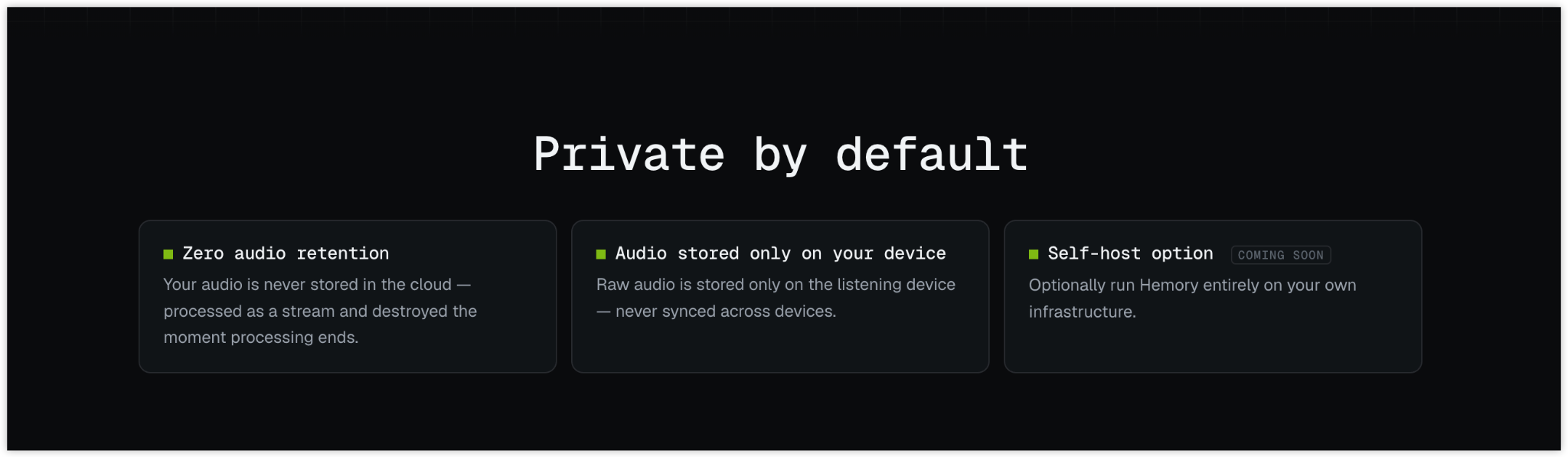
Privacy cards present claims about audio storage and retention.
Also look at how capture starts and stops. Hemory describes Manual Mode and a Schedule Mode with reminders and one-tap start and stop. This is user-controlled listening, not a claim that the microphone silently activates at every scheduled time.

Set listening times for weekdays and weekends.
Platform fit: can you use it where the conversation happens?
Check current platform support, any required device, and whether capture fits your actual setting. A feature listed as coming soon is not available support. Hemory’s Features page lists iOS and Apple Watch; its current product information also lists Android and Wear OS. Platform availability can change, so confirm the current support for the device you intend to use.

See the mobile and wearable platforms listed on the site.
Choose by the information you need later
Use these questions to make the choice:
- Is this mainly a thought or reminder for yourself? A voice note is likely the simplest fit.
- Do you want a spoken interaction with an assistant right now? Try AI voice mode, then check whether saving and later retrieval are part of the product’s actual behavior.
- Do you need details from discussions with other people to remain findable? Consider conversation memory if you can capture those discussions appropriately and retrieve them later.
- Does privacy or device compatibility rule out an option? Check specific data handling, consent needs, and supported platforms before committing to a workflow.
You do not have to use one method for everything. A personal reminder and a work discussion have different capture needs. Some people may prefer a voice note for an idea and conversation memory for discussions whose details could inform later work.
If the useful information is already in a CRM, transcript archive, or notes, you may be able to work from that source instead. Hemory is relevant when you want to preserve conversations it can capture, organize them into Memory, and retrieve information from accessible sessions. Capturing the discussion can leave you more room to participate; retrieval can reduce the later work of reconstructing and re-entering details. You still decide what to do with the result.
Frequently asked questions
Can conversation memory find a discussion I never recorded?
No. It can retrieve from captured and accessible material; it cannot reconstruct an exchange that was never recorded. Use another source or ask someone for the missing detail.
Does AI voice mode automatically create searchable conversation history?
Not necessarily. Voice interaction describes how you communicate with the assistant, not whether the product stores the exchange or makes it searchable later. Check the specific product’s retention and retrieval behavior.
Is a transcript enough to trust every detail?
No. A transcript is a record of speech, not a guarantee of complete or error-free capture. Review consequential wording, attribution, and conditions before relying on them.
Which option is most private?
There is no answer based on the category alone. Compare the product’s current statements and settings for raw audio, transcripts, summaries, and other data, and consider consent and the circumstances of capture.