

 Hemory Team
On this page
Introduction
A shared conversation memory store can spare you from re-entering background in every AI tool. But “shared” can describe very different things: several agents may connect to one source of captured context without sharing their private chat histories, getting identical access, or having the same ability to change data. Before moving personal conversations into a store, check what it contains, where each data type goes, and what each connected agent can do.
TL;DR
- Evaluate the store’s actual data types separately: raw audio, transcripts, summaries, and structured Memory may have different storage and deletion rules.
- Check each agent and connection on its own. A list of supported clients does not prove identical setup, access, or permissions.
- Confirm read and write scope, retention, deletion, and processing with current documentation and a controlled test—not with labels such as “vault” or “private.”
- Choose a shared store when its access boundaries and data handling fit your work. Otherwise, keep context in separate tools or share only a purpose-built brief.
What does a shared conversation memory store need to do?
Start with the work, not the product label. List the conversations or details you want to reuse and the agents that need them. For example, you might want one agent to find relevant points from captured discussions and another to use those points while drafting. That is a request for access to conversation context; it does not require either agent to see the other’s chat history or internal memory.
A suitable store should let you answer three practical questions:
- What information is preserved? Identify whether the store holds raw recordings, transcripts, summaries, extracted details, or some combination.
- Who or what can access each item? Determine whether access is limited by account, workspace, vault, connection, or another documented boundary.
- What happens next? Understand whether a connected agent can retrieve information only, make specific changes, or take actions in another system.
If you only need to pass a few approved details to one task, a short brief may be simpler than giving an agent access to a broader store. If several tasks regularly need relevant details from captured discussions, a shared source may reduce repeated searching and retelling—provided you can verify its boundaries.
Evaluate the store with these criteria
| Criterion | What to find out | How to assess the answer |
|---|---|---|
| Data types | Does the product store raw audio, transcripts, summaries, structured Memory, or other records? | Ask for a data-flow description that names each type. Do not assume a rule about audio applies to transcripts or summaries. |
| Storage and processing | Where is each data type stored and processed? Is it synced across devices or sent to another service? | Look for separate, specific answers for storage, transfer, and processing. “Private,” “local,” or “secure” alone does not explain the flow. |
| Connected-agent access | Which exact agents or clients can connect, and what information can each connection reach? | Check the current setup instructions and test each client you plan to use. A general integration listing is not proof of identical behavior. |
| Read and change permissions | Can an agent retrieve context? Can it change records, labels, or other data? Can it act in external tools? | Review the documented tools and permission descriptions for that connection. Separate changes inside the memory product from actions in an external system. |
| Retention and deletion | How long are recordings, transcripts, and other records kept? What does deletion remove, and from which systems? | Seek a clear answer for each data type, including copies or derived records where documented. If a material detail is not stated, treat it as unresolved. |
| Access changes | What happens when you revoke a connection, remove an agent, or change the account or vault it uses? | Confirm whether access stops immediately and whether previously retrieved information or external copies are affected. Do not assume revoking access erases prior outputs. |
| Client and version differences | Are setup, available tools, and permissions the same across the specific clients and versions you use? | Verify the current documentation for each route. Recheck after a client or product update if the distinction matters. |
A useful answer is specific enough to guide a decision. “Agents can access your memory” is incomplete unless you know which agent, which memory, through which connection, and whether access includes changes. “Audio is not stored in the cloud” also does not settle where transcripts or structured Memory are stored or processed.
Separate raw audio from transcripts and Memory
Treat each data type as its own part of the evaluation. A product may handle raw audio differently from the transcript created from it, and differently again from summaries or organized Memory. Ask what is retained, synced, processed, and deleted for each type. If the answer covers only recordings, do not extend it to the rest of the product.
For Hemory, the current homepage states that raw audio is stored only on the listening device and is not synced across devices; it also describes audio as streamed for processing and destroyed when processing ends. That statement is about raw audio. It does not establish that transcripts or structured Memory are stored locally, that the whole product works offline, or what their retention and deletion rules are. Confirm those details separately if they affect your decision.
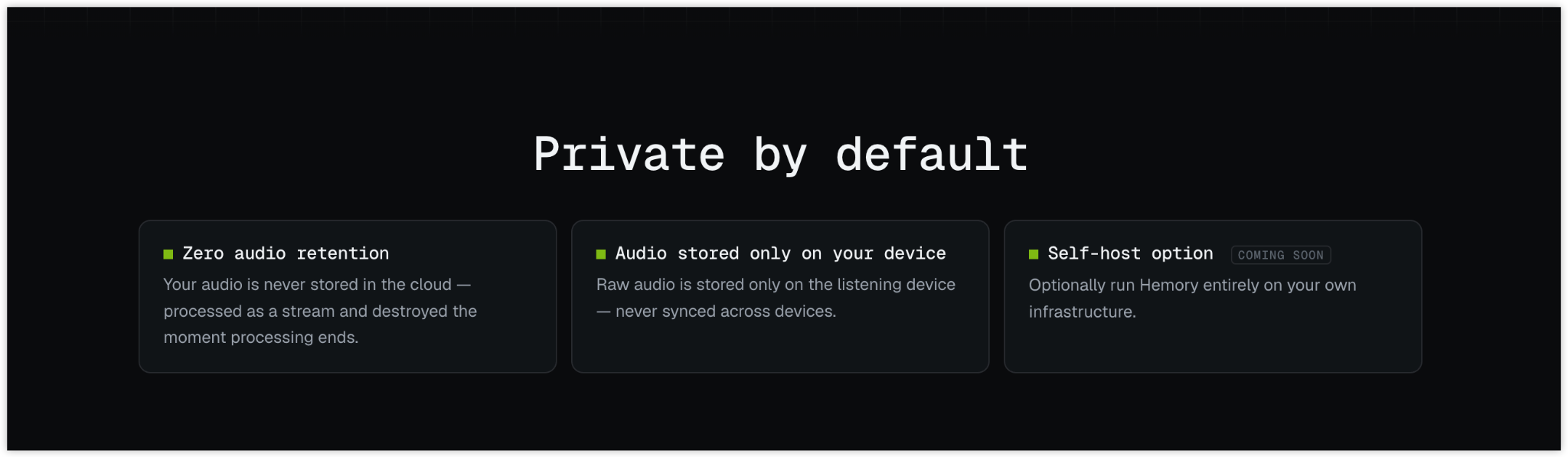
Privacy cards present claims about audio storage and retention.
The current Features page describes timestamped transcripts with speaker labels and AI cleanup, plus Hemory’s built-in Q&A for questions about a user’s Memory. It also describes retrieval across conversation sessions and an MCP route for connected agents. Those capabilities can help make captured discussions useful for later tasks; they do not establish universal access across every client or answer every data-handling question.
Check each agent’s connection and permissions
Treat every agent connection as a separate route to evaluate. Hemory’s public materials list several MCP clients and describe Memory retrieval; its Changelog documents Speaker labeling and management through MCP. That documented capability does not establish that agents can make arbitrary changes to Memory, access every type of data, or take actions in other systems.
For each agent you intend to use, verify:
- The current connection steps and the account, vault, or other scope the connection uses.
- Which retrieval or management tools are available to that client.
- Whether the documented permissions match your intended use, especially for any changes.
- Whether the agent’s own data handling is acceptable for the information it receives.
- What remains accessible if you disconnect the agent or remove its authorization.
Do not infer that every client named in an integration list has been tested in the same way or exposes the same tools. Platforms marked “Coming soon” are not generally available. Confirm the current status of the specific platform and connection before relying on it.
Run a small, controlled evaluation
Documentation should answer policy and capability questions; a limited test can show whether a specific route works for your task. Use non-sensitive, already captured material and an account or environment appropriate for evaluation. Do not use real personal conversations until you understand the relevant data flow and permissions.
- Choose a representative task. For example, ask one agent to retrieve a detail from a previously captured discussion and another to use relevant context in a draft. Use only material you are authorized to process.
- Check what the agent can retrieve. Compare its response with the source record. Note whether it can find the information you need and whether it explains the relevant conditions or uncertainty.
- Check the connection’s scope. Use the product’s documented controls or test procedure to establish what the agent can access. Do not probe beyond the authorized scope.
- Check changes separately. If the workflow requires a change, verify that the precise change is documented and authorized before testing it. Do not assume retrieval permission includes write permission.
- Review the output and next step. Confirm that the agent has not turned a suggestion into an agreement or a past statement into a current status. A person still needs to review consequential work and decide what to share or act on.
This is a fit check, not proof of a product’s full security or privacy posture. A successful retrieval test does not establish retention, deletion, or processing terms. Use the product’s current documentation for those questions and record any unanswered material point before deciding.
Choose a setup based on the result
A shared store is worth considering when multiple tasks genuinely need the same captured context, the exact agent connections are supported, and you can confirm the access and handling rules that matter to you. It may reduce repeated preparation: instead of manually assembling the same discussion history for each task, a connected agent can retrieve relevant captured context within the access available to it.
Keep tools separate, or pass a narrower brief, when access boundaries are unclear, a client lacks the needed controls, retention terms are unacceptable or unresolved, or the task needs only a small amount of context. A single shared source is not automatically safer or more convenient than separate tools. The right choice depends on the information involved, the specific connections, and the consequences of access or disclosure.
Before committing, write down the exact answers you have for data types, storage and processing, agent-by-agent access, change permissions, retention, deletion, and revocation. Mark unknowns plainly. If a material question remains unanswered, pause sensitive use or choose a narrower workflow until you can resolve it.
FAQ
Does “shared memory” mean agents share their chat histories?
No. Access to a conversation memory source does not imply that connected agents share private chat histories, internal memory, tools, or execution state. Evaluate the store connection and each agent’s own data handling separately.
If raw audio stays on the device, does that mean all conversation data is local?
No. A statement about raw audio does not establish where transcripts, summaries, or structured Memory are stored or processed. Check the handling rules for each data type.
Can I assume every connected agent has the same permissions?
No. Check the exact client, connection, available tools, and documented permissions. A shared source does not make every connection identical.
What if the product does not explain retention or deletion clearly?
Treat that as an unresolved decision point. Ask for a specific answer covering each relevant data type and what deletion removes. Until the answer meets your needs, avoid putting sensitive material in that workflow or use a narrower alternative.
Next step
Choose one real task and one intended agent connection, then fill in the checklist before adding sensitive context. With Hemory or another suitable store, captured conversations can provide reusable background for later work; your decision should still rest on the specific data flow and permissions you can confirm—not on the promise of a shared “vault.”