

 Hemory Team
On this page
Recording a conversation can create more than an audio file: an app may also produce a transcript, speaker labels, summaries, or searchable records. Before recording other people, find out what the app captures, how it handles that information, and who may be able to access it. This checklist helps you review the consent process and the product’s current official privacy information before you begin. It is general guidance, not legal advice.
TL;DR
- Ask participants before recording, and check the rules that apply to your location and situation. Do not treat silence as permission.
- Review each data type separately: audio, transcripts, speaker information, summaries, and any connected-agent access may have different handling.
- Look for clear answers about storage, retention, deletion, sharing, and access. If a material answer is missing, do not record a sensitive conversation until you have an acceptable alternative.
1. Clarify consent before you start
Check both the product’s consent information and your own plan for informing people. A device notification or recording indicator may not tell participants enough about what is being captured or how it will be used.
Before recording, consider:
- Who needs to know? Identify everyone who may be recorded, including people who join after a conversation begins.
- What will you tell them? Explain that recording is happening, what the record is for, and whether a transcript or summary will also be created.
- How can someone decline? Decide how to pause or stop recording, or continue without recording, if a participant is uncomfortable.
- What rules apply? Recording requirements vary by location and circumstance. Check applicable rules or seek qualified advice when needed; this checklist cannot determine what is legally permitted.
A product’s recording control is not a substitute for a clear conversation with participants. If someone objects, pause recording and use an appropriate alternative, such as written notes.
2. Find out what the app captures and creates
Do not evaluate privacy by looking only for the word “recording.” Check whether the app also creates or uses other information, and whether those items are handled differently.
Look for descriptions of:
| Data or capability | Questions to resolve |
|---|---|
| Audio | Is audio retained, processed temporarily, or stored somewhere? Does the answer vary by device or feature? |
| Transcripts | Are spoken words transcribed? Can transcripts be corrected, searched, or shared? |
| Speaker information | Are people labeled by name or voice? Are voiceprints or other biometric identifiers involved, and what consent applies to them? |
| Summaries and Memory | What records are created from a conversation? Can they be searched or used to answer questions later? |
| Connected services | Can an external AI agent or other integration access conversation records? What data and permissions are involved? |
A feature list can help you identify what to ask about, but it does not establish where data is stored or how long it remains. For example, Hemory’s Features page describes listening modes and transcript creation. Those feature descriptions should not be treated as a complete account of the privacy terms for every data type.
3. Check storage, processing, and retention
Read the current official privacy policy and any relevant product terms. Look for specific answers to these questions:
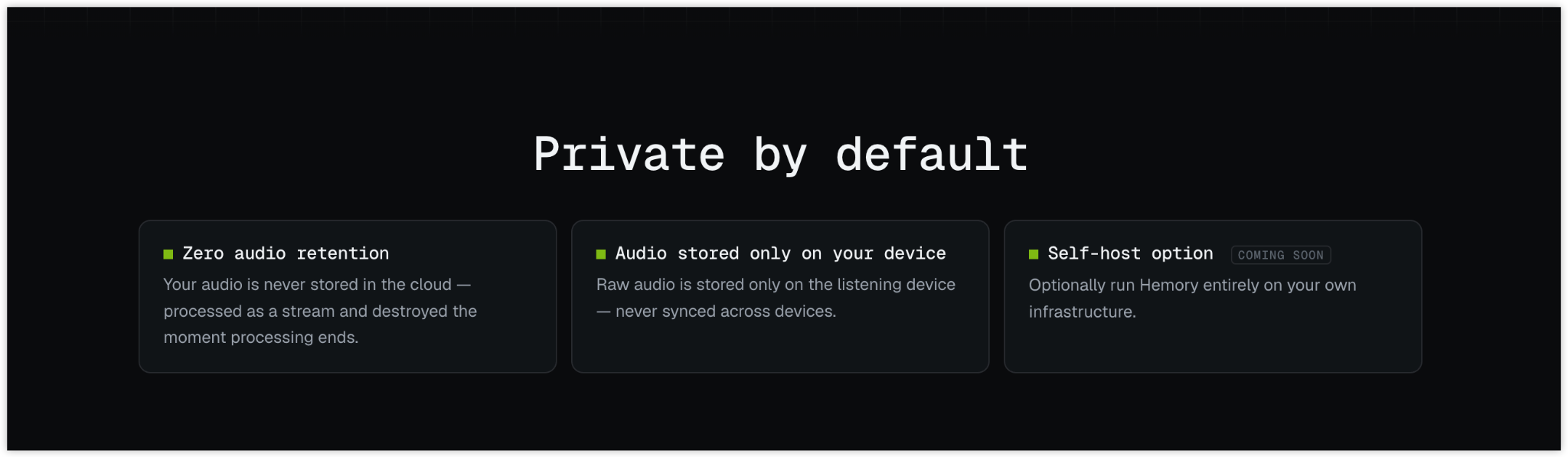
Privacy cards present claims about audio storage and retention.
- Where are audio, transcripts, summaries, and other conversation records stored or processed?
- Does handling differ between the device, the service, and connected third-party tools?
- How long is each type of information retained? Does retention depend on your settings, plan, or account status?
- Is any information used to improve or train AI models? Does the answer differ by data type or feature?
- Are service providers involved, and what does the policy say about their access and role?
Avoid broad assumptions. A statement about audio does not automatically explain the handling of transcripts or structured records. Similarly, a setting that controls recording does not necessarily control storage or retention.
If the policy uses general language that does not answer a question important to your situation, ask the provider for clarification. Record the answer and its date if you need to rely on it later.
4. Understand deletion and what it covers
“Delete” can refer to different actions. Before relying on it, find out what happens when you delete an individual conversation, a transcript, a summary, or your account.
Check whether deletion covers each relevant data type, including copies in connected services, and whether any retained backups or legally required records are described in the policy. Also look for how long deletion may take and whether deleted information can still be accessed during that period.
Do not assume that removing a visible transcript removes every related record. If you cannot establish what a deletion control covers, avoid recording information that would be difficult to manage under that uncertainty.
5. Review access, sharing, and connected tools
Ask who can view or use the resulting records. Consider your own account, anyone you share with, and any connected service or AI agent. Check whether access is limited by account, workspace, connection, or another permission, and how to revoke it.
A connection to an external tool does not, by itself, tell you what that tool can read or do. Review the permissions described for the specific connection and the provider’s explanation of how data is handled. Do not assume that a personal memory store is a shared team archive—or that removing an integration also deletes records the other service already received.
Keep sensitive or confidential conversations out of a workflow until you understand who can access their records and whether that access fits your obligations to participants or your organization.
6. Make a decision before the conversation
Use your answers to choose a proportionate approach:
- Proceed with recording only when participants have been informed as appropriate, the data handling fits the conversation, and the important privacy questions have clear answers.
- Limit what you capture or share when the app gives you a suitable way to do so and you understand the effect of that choice.
- Use notes or another method when consent, storage, deletion, or access remains unclear and the conversation is sensitive.
For a first use, choose a low-risk conversation and review the resulting records and available controls. This can help you understand the workflow, but it does not replace reading the official policy or resolving unanswered questions.
Before relying on any memory app, keep a short record of the policy version or date you reviewed and the answers that shaped your decision. Revisit those answers if the product changes, you add a connected service, or the kinds of conversations you record become more sensitive.
FAQ
Is a recording indicator enough to inform people?
Not necessarily. An indicator may show that recording is active, but participants may still need a clear explanation of what is captured and how it will be used. Check the rules that apply to your situation and communicate directly with the people involved.
Does deleting a transcript delete the audio and summaries too?
Not automatically. Deletion can apply differently to audio, transcripts, summaries, account data, and copies held by connected services. Check the product’s policy for each type rather than inferring that one deletion action covers all of them.
Can I tell from a feature page where my data is stored?
Only if the page specifically says so, and even then check which data type and feature the statement covers. Use the current official privacy policy and terms for storage, processing, retention, deletion, and sharing details.
Before you record
Work through the checklist before capturing a conversation, not after a sensitive record has been created. If an important answer is missing, ask the provider or choose a method that gives you clearer control. The aim is to understand the full path from what is spoken to what is stored, retained, and shared.