

 Hemory Team
On this page
When you have both a phone and a watch, choosing which one listens to a sensitive conversation is also a choice about where its raw audio stays. Hemory states that raw audio remains on the device doing the listening and is never synced to another device. That statement is specifically about raw audio; it does not establish how transcripts or organized Memory behave across devices.
The short answer
Choose the device on which you are comfortable keeping the raw audio. With Hemory, that means choosing between a supported phone and Apple Watch based on your circumstances—not assuming a recording made on one will move to the other.
- Prefer the phone if you want the listening device to be the phone you are carrying and controlling.
- Consider Apple Watch if you have a supported Apple Watch and prefer to start listening from your wrist. Hemory describes the watch as able to listen independently.
- Do not treat either choice as a way to sync raw audio. Hemory says raw audio is stored only on the listening device and is never synced across devices.
- Keep transcripts and Memory separate from that rule. Hemory produces transcripts and organizes conversation Memory, but the available product information does not establish that their cross-device behavior matches raw audio storage.
Decide which device should listen
1. Start with the device-level privacy boundary
Ask yourself where you are comfortable having the raw audio remain. Hemory’s stated rule is that raw audio stays on the device that listened and is not synced to another device. If you choose your phone, the raw audio stays on the phone that listened; if you choose your Apple Watch, it stays on the watch that listened.
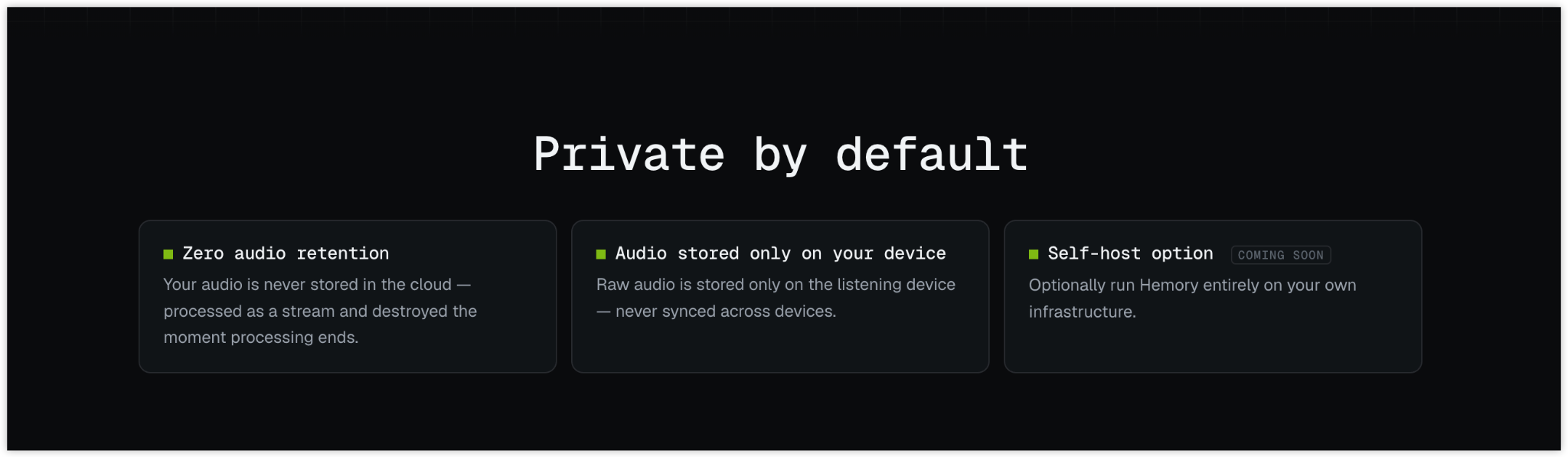
Privacy cards present claims about audio storage and retention.
This is a device-storage distinction, not a claim that all Hemory data stays on that device or that the entire product works offline. Hemory also creates a transcript and organizes Memory from listening sessions. The supplied product information does not specify whether those materials sync between your phone and watch, so do not infer their availability from the raw-audio statement.
2. Consider how you will start and manage listening
Hemory lists iOS and Apple Watch as supported platforms. Its product information says an Apple Watch can listen independently, so you do not need to assume the phone is the listening device when using the watch. Choose the option you can use deliberately in the situation, and make sure you know how to start and stop listening on that device.

Hemory listening interface shown on Apple Watch.
If a watch is not already part of your setup, the phone may be the more straightforward choice. If you prefer the watch’s form factor, consider whether it is charged and available for the conversation. The published listening and battery figures are model-specific; do not treat them as a guarantee for every watch model.
3. Think about the later work product separately
The raw audio is not the same thing as the transcript or organized Memory you may use later. Hemory describes listening sessions as producing timestamped transcripts and activity-based summaries. Those records can support later review, but the facts available here do not confirm that they are accessible on another device in every situation.
If you need a transcript or Memory on a particular device, confirm that access through your actual Hemory setup rather than relying on the raw-audio storage statement. If a key detail is unavailable later, use another accessible record or ask a focused follow-up; a recording device cannot recover an exchange that was never captured.
4. Make the recording appropriate for the conversation
A device choice does not replace consent or workplace rules. For a sensitive discussion, tell participants when recording is appropriate, follow the requirements that apply to your situation, and do not start listening if you lack the necessary permission. Use manual controls so you know when listening begins and ends.
A useful decision check is:
| If your priority is… | Consider… | Keep in mind… |
|---|---|---|
| Having the phone be the listening device | Your supported iPhone | Raw audio stays on the listening device; it is not synced to another device. |
| Starting listening from your wrist | A supported Apple Watch | Hemory describes Apple Watch listening as independent. Battery figures vary by model. |
| Accessing the transcript or Memory elsewhere later | The device choice alone does not answer this | Cross-device behavior for transcripts and Memory is not established by the raw-audio statement. Confirm access in your setup. |
Frequently asked questions
If I record on my watch, does the raw audio appear on my phone?
No. Hemory states that raw audio is stored only on the device that listened and is never synced across devices. This statement does not determine how transcripts or organized Memory are accessed.
Does the raw-audio rule mean transcripts and Memory stay on the same device too?
That cannot be concluded from the raw-audio rule. Hemory describes transcripts and organized Memory separately, and the supplied information does not establish their cross-device sync behavior.
Can any smartwatch be used to record with Hemory?
Do not assume so. Hemory lists Apple Watch as a supported platform. The supplied information does not establish support for every watch model or smartwatch platform.
Choose for the conversation, not for assumed syncing
Pick the phone or supported Apple Watch you are comfortable using as the listening device, and remember that raw audio stays there rather than syncing to the other device. Treat transcripts and Memory as separate records: check their availability through your setup instead of assuming they follow the same storage rule. For a sensitive conversation, make permission and clear start-and-stop control part of the decision.