

 Hemory Team
On this page
A recorder can describe itself as “on-device” without making clear whether that applies to recording, transcription, transcript cleanup, or storage. If you handle sensitive conversations, evaluate those stages separately before deciding what the claim means for your privacy needs.
TL;DR
- “On-device transcription” should specify that speech is converted into text on the device. It does not, by itself, establish where audio is stored, whether transcripts sync, or how later AI processing works.
- Ask about raw audio, transcript text, derived notes, processing location, retention, and sync as separate questions.
- Treat an offline test as one useful observation, not proof of a vendor’s full data flow.
- Hemory’s homepage describes specific handling of raw audio, but does not establish where transcription or transcript cleanup occurs. That location remains unverified.
What does “on-device transcription” actually mean?
The phrase should describe where the speech-to-text computation happens: on the recorder or another device you control, rather than on a remote server. Ask whether that applies to the entire transcription process or only one stage. A recorder might capture audio locally but send it elsewhere for transcription, or transcribe locally and later sync the transcript.
“On-device” is not a complete privacy policy. It does not automatically tell you whether the app sends data for account features, backup, AI cleanup, search, or sharing. Nor does it tell you how long a transcript remains available or what happens when you delete it.
Start by naming the data you care about. “Does my recording leave my device?” is more useful than “Is it private?”—and may still need a follow-up about transcripts and derived records.
Ask about each data type and stage separately
| Data or stage | Questions to ask | What the answer establishes |
|---|---|---|
| Recording and capture | Where is audio captured? Is any audio transmitted while recording or afterward? | The capture and transfer path, not necessarily the transcription location. |
| Transcription | Where is speech converted into text? Does any audio leave the device for this step? | Whether the transcription claim is local, remote, or split across stages. |
| Transcript cleanup or other AI processing | Is text sent to a separate service for correction, summaries, or analysis? | Whether text or audio is processed beyond transcription. |
| Storage and retention | Where are audio and transcripts stored, for how long, and what does deletion remove? | The saved-data lifecycle; this is separate from where processing occurs. |
| Sync and access | Do audio, transcripts, or notes sync to other devices or accounts? Who can access them? | Whether records move or become available elsewhere after capture. |
A useful answer names the data type, the processing stage, the destination, and any conditions that change the answer—for example, a particular feature, platform, or account setting. If the response only says “audio stays on your device,” ask separately about transcript text and anything generated from it.
How to assess a privacy claim before choosing
Ask for a specific data-flow answer
Use a question that asks about both the input and the result:
For this device and app version, where are raw audio and transcript text processed and stored? Does either leave the device for transcription, cleanup, sync, backup, or another feature? What is retained, and what does deletion remove?
If you need transcription to remain local, say so directly. Ask whether that promise covers transcription itself, not just recording or storage. If the answer depends on a setting or platform, ask which one and whether it is enabled by default.
Check documentation against the exact claim
Look for current documentation that identifies the relevant feature and data type. A statement about raw-audio storage does not answer where transcription runs. A description of transcript playback on a device does not establish that the transcript was created there. Likewise, a privacy policy’s general data-handling language may not specify the processing path for one feature.
If the documentation leaves a material question unanswered, treat it as unresolved rather than filling the gap with an assumption. For sensitive use, request clarification from the vendor or choose an option whose documented behavior meets your requirements.
Use offline behavior as a limited check
If appropriate for your device and workflow, test whether transcription works with network access disabled. Record what happens, including whether the app reports an error or appears to queue work until reconnection. This can reveal behavior in that test, but it does not prove that no data is transmitted in normal use, that every feature works the same way, or that queued data is never sent later.
A network observation is not a substitute for a clear data-flow statement. If the answer matters for legal, organizational, or client requirements, use the documentation and assurance process your organization requires.
What Hemory’s public statements do—and do not—establish
Hemory’s homepage says raw audio is processed as a stream and destroyed when processing ends; it also says raw audio is stored only on the listening device and is never synced across devices. These statements concern raw audio. They do not establish where transcription or AI cleanup occurs, or how transcripts and structured Memory are stored or synced.
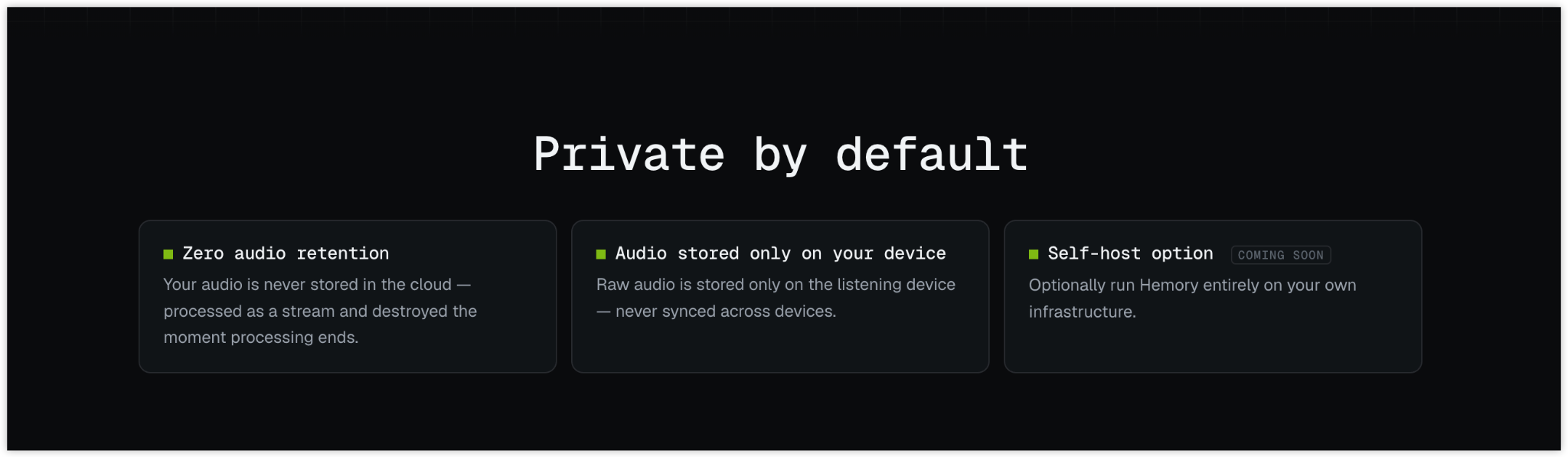
Privacy cards present claims about audio storage and retention.
The Features page describes listening sessions that produce timestamped transcripts with speaker labels and AI cleanup, and says transcript lines can be played back on the listening device. Those descriptions do not specify where transcription or cleanup runs. Playback on the listening device is not evidence that the transcript was created there (Hemory Features page).
So if on-device transcription is a requirement, ask Hemory specifically where speech is converted into text and whether audio leaves the device for that step. Treat the answer as Needs Verification until the processing location is confirmed. Do not infer that the product is fully offline or that transcripts and Memory follow the raw-audio policy.
Choose according to the privacy boundary you need
Before choosing, write down the boundary that matters most: no audio transfer, local transcription, no transcript sync, limited retention, or some combination. Then compare vendors against that same boundary, using answers that address each relevant data type and stage.
If a vendor cannot clarify a requirement that is essential to your use, treat that uncertainty as a selection issue—not as proof of either safety or a breach. For a lower-risk use, you may decide that the available answer is sufficient; for sensitive conversations, require stronger documentation or a confirmed answer before recording.
FAQ
Does “on-device” mean no data ever leaves the recorder?
No. It describes a processing location only when the vendor specifies which process it means. Ask separately about storage, sync, backup, transcript processing, and other features.
If a transcript plays back on my device, was it transcribed there?
Not necessarily. Playback identifies where you can listen to a transcript line, not where speech was converted into text.
Is an offline test enough to verify a privacy claim?
No. It can show how a particular setup behaves during that test, but it cannot establish every normal-use data flow or what happens after the device reconnects.
What should I do if a vendor does not say where transcription happens?
Treat the location as unconfirmed. Ask the vendor directly, and do not count the tool as meeting a local-transcription requirement until you have an answer that covers the relevant feature and platform.
Next step
Turn your privacy requirement into separate questions about audio, transcript text, processing, storage, and sync. That gives you a consistent basis for comparing recorders—and makes it easier to identify which unanswered detail could change your choice.