

 Hemory Team
On this page
A long list of voice memos can hold valuable ideas while still being difficult to use. If you remember what you said but not which file contains it, you may have to guess from filenames or replay recordings. A searchable archive can make spoken content easier to revisit, but it adds a different capture and data-handling model. The right choice depends on how often you return to old notes and what you need to find.
TL;DR
- Keep plain audio files when you rarely revisit recordings, already recognize the right file, or mainly want a personal listening archive.
- Consider searchable capture when you often need to find an idea by its subject or recover what was discussed across sessions. Check the specific search capabilities rather than assuming every archive supports the same queries.
- Hemory describes timestamped transcripts with Speaker labels and AI cleanup, plus built-in Q&A grounded in transcripts across conversation sessions. Those features are for captured listening sessions; don’t assume they import existing phone memos.
- Try the approach with future notes you expect to reuse. Compare whether you can find a useful detail with less effort, and review privacy and device requirements before relying on it.
What is the difference?
A plain audio file preserves a recording for playback. You can organize files in folders, name them, and add your own notes, but finding an idea inside one may require remembering where it is or listening through it again.
A searchable voice-note archive makes spoken content easier to retrieve by organizing captured conversations as text and related records. Depending on the product, retrieval may use transcript text, questions about a topic, or both. Those are distinct capabilities: a transcript does not by itself establish which kinds of search or questions a particular product supports.
Hemory describes each listening session as producing a timestamped transcript with Speaker labels and AI cleanup. Its built-in Q&A Agent supports multi-turn questions grounded in transcripts and can retrieve across conversation sessions. That is different from simply keeping a list of audio files. The available product description does not establish that every possible query—such as exact-phrase search or searching by person—is supported in every interface.

Find individual statements in a searchable transcript.
Compare the options on the work you need to do
| Criterion | Plain audio files | Searchable captured conversations |
|---|---|---|
| Finding a specific idea | Works well if you remember the file, have useful filenames, or keep separate notes. Otherwise, you may need to replay recordings. | Can make transcript content or cross-session questions available for retrieval, depending on the product’s supported features. Check whether it handles the kinds of clues you actually remember. |
| Keeping the original sound | The recording is the main record and can preserve tone and delivery. | A transcript can make spoken content easier to revisit, but it is not a perfect substitute for audio. Transcription may contain errors or omissions. |
| Setup and ongoing effort | Usually simple to start; useful retrieval may depend on your own naming and filing habits. | Requires capturing sessions through a supported method and trusting the archive’s organization and retrieval for your use case. |
| Reusing ideas across notes | You can listen to several files and assemble the relevant details yourself. | Cross-session retrieval may help connect material from multiple captured conversations, but shared topics or names do not automatically prove that separate discussions belong together. Review the result. |
| Privacy and access | Check where recordings are stored, whether they sync, and which devices or people can access them. | Check those same points for each data type. A statement about audio storage does not establish how transcripts or structured records are stored or synced. |
| Portability | Audio files may be straightforward to move or back up, depending on your device and storage setup. | Check export, access, and device support before making the archive your only copy. Do not assume a searchable archive accepts existing audio files. |
When plain audio files are enough
Keep using audio files if you mainly record thoughts for yourself, rarely need to find a particular detail, and can identify recordings from their names or dates. They may also be the better fit when keeping an original recording matters more than searching its contents, or when you prefer not to add another capture and storage system.
You can make a basic file archive easier to use without changing tools: give recordings descriptive names, group them by project or period, and add a short note when a memo will matter later. This does not make the audio searchable by its spoken content, but it may be enough if your archive is small or your retrieval needs are occasional.
When searchable capture may be worth it
A searchable archive is more compelling when you repeatedly revisit spoken ideas, need details from past discussions, or want to connect points made at different times. The benefit is not simply having a transcript. It is being able to retrieve useful context without selecting and replaying every recording yourself.
With Hemory, the documented route begins with a listening session captured in Hemory. The session produces a timestamped transcript with Speaker labels and AI cleanup; its built-in Q&A Agent can answer multi-turn questions about Memory using transcripts across sessions. This can reduce manual listening and retelling when you are trying to recover a past idea. It does not establish perfect transcription, absolute speaker accuracy, or support for every kind of text search. Confirm that the available way to retrieve information fits your actual need.
Do not assume an existing phone memo can be transferred into Hemory: the supplied product information describes captured listening sessions, not arbitrary historical audio import. You can keep old files where they are and try searchable capture with new ideas or conversations you expect to use again.
Check the trade-offs before switching
Test retrieval with the clues you actually have
Before relying on a tool, choose a few real questions you would want to answer later. For example: “What was the idea I had about onboarding?” or “What did we discuss about the launch sequence?” Notice whether you tend to remember a topic, a date, a person, or exact wording. Then confirm that the product supports the relevant retrieval method; do not treat a successful general Q&A example as proof of exact-phrase or person-based search.
Judge the result by whether it brings back enough relevant context to help you act. If wording, attribution, or a condition matters, review the available transcript or other source. A transcript is a record of speech, not a guarantee that every word was captured or interpreted correctly.
Check privacy by data type
Ask what happens to the audio, transcript, and any organized records separately. Hemory’s homepage states that raw audio is stored only on the listening device and is not synced across devices. That statement applies to raw audio; it does not establish the storage or sync behavior of transcripts or structured Memory. Review the product’s current information for the data you intend to rely on, and consider who can access it.
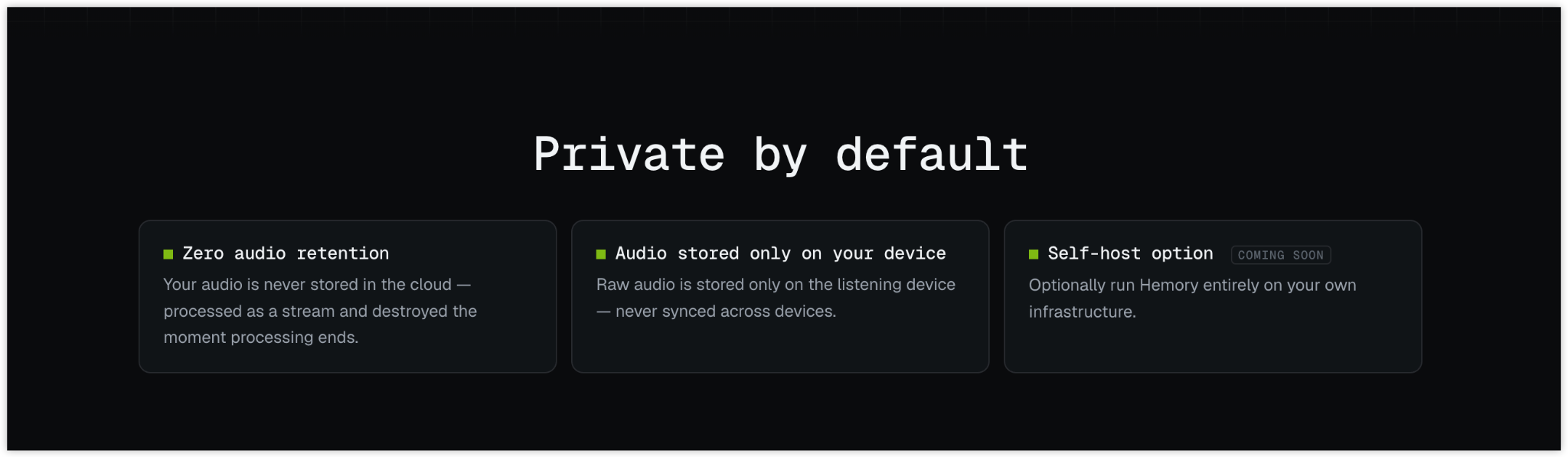
Privacy cards present claims about audio storage and retention.
Consider device and workflow fit
Check that the supported capture method works with the device and situations where you form useful ideas. Hemory’s Features page describes capture on supported listening platforms; that does not mean it records every call, meeting, or existing memo. If an idea is already in an audio file, keep using that file unless a supported route for bringing it into the archive is confirmed.
Compare the effort you would otherwise spend
Think about the work you do today: naming files, remembering where an idea was recorded, replaying audio, and assembling related details. A searchable archive is worth considering if that retrieval work is a recurring obstacle. If you can find what you need with little effort, extra capture and storage may not be worthwhile.
A low-risk way to choose
Try searchable capture for a small set of future notes that you expect to revisit. Keep your existing audio files in place. Later, use the kinds of clues you normally remember to retrieve one or two useful details, and compare that effort with your current file-based approach.
Choose the searchable approach if it reliably helps with your actual retrieval needs and its privacy, device, and access boundaries fit your situation. Keep plain audio if playback and simple organization are enough. You can also use both: audio for recordings you want to preserve as sound, and searchable capture for new conversations whose details you expect to reuse.
FAQ
Does a searchable voice-note archive let me find every word I remember?
Not necessarily. A transcript may help, and some products support questions about captured conversations, but exact-phrase search and other retrieval controls vary. Confirm the specific capability you need, and allow for transcription errors or omissions.
Can Hemory search through old voice memos on my phone?
The supplied product information describes transcripts and Q&A for listening sessions captured in Hemory; it does not establish support for importing arbitrary historical audio files. Keep existing memos where they are unless a supported import route is confirmed.
Is a transcript as useful as keeping the original audio?
They serve different purposes. A transcript can make spoken content easier to scan or retrieve, while audio preserves sound and delivery. If either matters, check what the tool retains and keep the relevant record available.
Should I move all my voice notes into a searchable archive?
Not by default. Start with future notes you expect to reuse, then compare retrieval effort and check privacy, device support, and access. Keep plain files when they already meet your needs.