

 Hemory Team
On this page
When you need to revisit a conversation months later, the right record depends on what you need to find: exact wording, a quick overview, or how a topic developed across several discussions. Each format keeps different details and creates a different review burden.
TL;DR
- Keep recordings when vocal delivery or surrounding sound may matter and you can manage the storage, access, and review burden.
- Use transcripts to search and inspect spoken details; use summaries for a faster overview, knowing they select rather than preserve everything.
- Searchable conversation memory is useful when you need to retrieve context across captured discussions. It complements, rather than guarantees or replaces, a current decision record.
- A practical setup can combine a short summary for routine work with access to a transcript or recording when a detail needs closer review.
What each format helps you find
| Format | What it preserves or makes easier | Main trade-off | Best suited to |
|---|---|---|---|
| Raw recording | The spoken exchange, including vocal delivery and surrounding sound, depending on capture quality | Harder to scan; replay takes time, and storage, access, and retention need consideration | Questions where how something was said or heard may matter |
| Transcript | A text version of the conversation that is easier to search and inspect | Transcription can contain errors or omissions; speaker labels are not proof of identity or agreement | Finding wording, a topic, or a passage to review |
| Summary | A concise account of selected points, such as topics, decisions, or actions | Faster to scan, but details outside the summary may be absent | Routine review and carrying forward the main points |
| Searchable conversation memory | A way to organize and retrieve relevant context across captured discussions | Retrieval depends on what was captured and accessible; it does not guarantee that every relevant detail will be found | Recalling how an idea or discussion developed over time, or supplying context to later work |
These are not always mutually exclusive storage choices. A searchable memory may include transcripts and summaries; it describes how information is organized and retrieved, not one single record format. A current decision log, project tracker, or shared brief may still be the best place for the team’s agreed next steps.
Choose by the question you may ask later
Keep audio when delivery or sound may matter
A transcript records words in text, while audio may retain features such as emphasis, pauses, or surrounding sound. Those details can matter when reviewing tone or interpreting an unclear exchange. Audio is less convenient for quickly locating a phrase, though, and keeping it requires decisions about access, retention, and storage.
Before relying on a recording, consider whether it was captured, whether you can still access it, and whether replay is appropriate for the task. Do not assume a transcript or summary exists just because audio was recorded.
Use transcripts when you need searchable detail
Text is generally quicker to scan and search than an entire recording. A transcript can help you locate a passage and see what was said around it. But transcription is not guaranteed to be complete or error-free, and a speaker label alone does not establish who accepted a task or whether the group approved a decision.

Find individual statements in a searchable transcript.
For a consequential detail, inspect the surrounding exchange and compare it with current project information. Replay audio only if it is available and the distinction matters; reviewing every recording is not necessary for every routine lookup.
Use summaries when a quick overview is enough
Summaries make recurring review lighter by selecting key points. Their usefulness depends on the task: a meeting recap may need decisions and actions, while a casual conversation may only warrant a brief note. Requiring formal minutes for every exchange can create unnecessary review work and make informal discussions feel more official than they were.

See how a meeting summary highlights decisions and follow-ups.
A summary is not a substitute for the source when you need exact wording or the reasoning behind a decision. Treat it as an efficient starting point, then return to a transcript, recording, or current work record when a missing detail could change what you do.
Hemory illustrates how records can vary by activity: its product description says it automatically classifies activities and provides structured meeting notes for meetings, while lighter activities such as meals and casual conversation receive lighter summaries. The useful principle is broader than any one tool: match the record to the conversation and the likely later use.
Use searchable memory when the question spans conversations
A single summary is useful for one exchange. If you later need to connect a customer’s earlier concern to a subsequent discussion, or recall how a proposal changed, searching across captured conversations can reduce the need to remember which note or meeting to open first.
Hemory’s built-in Q&A is described as supporting multi-turn, transcript-based questions about a user’s Memory and retrieval across conversation sessions. This can help with direct recall and, where relevant, provide background for later AI-supported work. It can only work with conversations that were captured and are accessible through the feature. It does not guarantee complete recall, establish that a decision remains current, or replace your judgment about what to use.

Retrieve past commitments and draft follow-up tasks.
A hybrid often balances recall and review effort
For many work conversations, a useful approach is to keep a concise summary for routine scanning and retain access to more detailed records for questions the summary cannot answer. If the question involves several discussions, search across the captured material; if it concerns an active commitment, carry the confirmed current state into the team’s usual project record.
For example, a short summary might say, “The team discussed adding an export option; scope and timing remain open.” If someone later asks whether a date was agreed, that summary is not enough to establish one. Search the relevant captured discussion and review the exchange. If no usable record exists, ask a focused clarification rather than filling the gap with an assumption.
The same principle applies to informal conversations: preserve enough for likely future use without forcing every chat into a full meeting record. Keep a more detailed source when the stakes or expected questions justify the extra review burden.
Include privacy and access in the choice
Compare formats not only by searchability but also by what is retained, who can access it, how long it is kept, and whether it can be used in later AI workflows. Check the policy for the specific data type; a statement about raw audio does not establish how transcripts or structured Memory are handled.
For Hemory specifically, its homepage states that raw audio is not stored in the cloud. That statement should not be extended to transcripts or structured Memory, or taken to mean the whole product is fully offline. Review the applicable information for the data and workflow you plan to use.
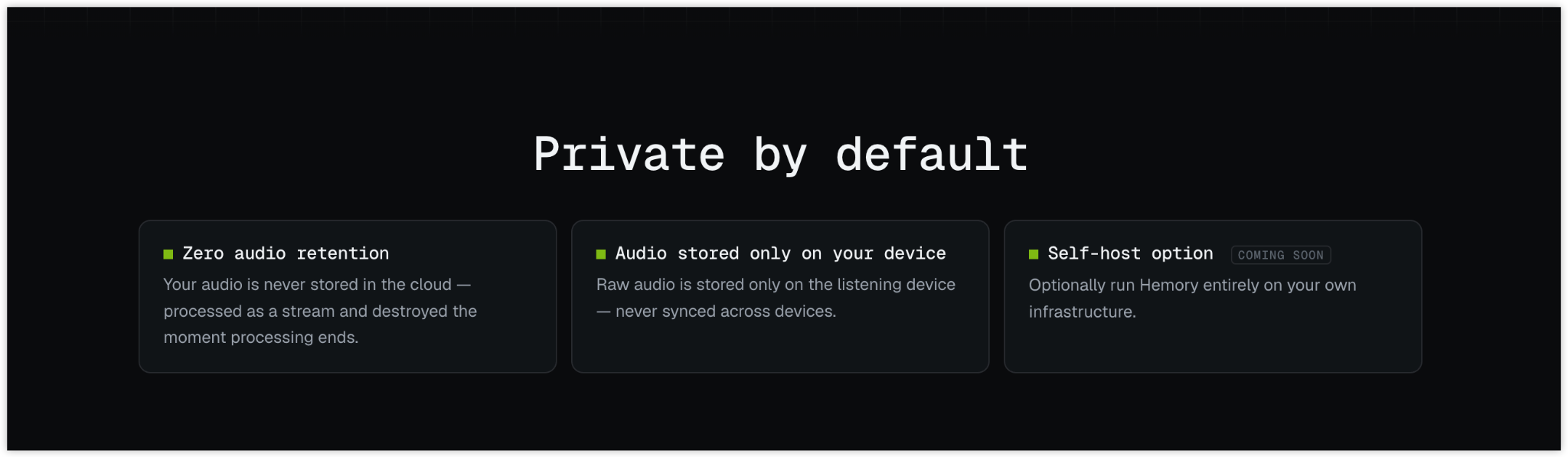
Privacy cards present claims about audio storage and retention.
Which format should you choose?
- Choose recordings when delivery or sound may affect interpretation and the added review and retention responsibilities are acceptable.
- Choose transcripts when searchable detail matters and you may need to inspect the exchange.
- Choose summaries when the main points are enough for routine review; keep access to the source for questions they cannot answer.
- Choose searchable conversation memory when you need to retrieve or relate context across captured discussions, especially for later recall or supported AI collaboration.
- Combine formats when your work needs both quick scanning and a path back to detail. Keep active decisions and commitments in the current work system rather than relying solely on a past conversation record.
Start with one real question you expect to answer later. Choose the lightest record that can answer it, and preserve a route to more detail when the consequences justify it. Hemory can help retrieve context from captured conversations; the right record still depends on what you need to know and how the result will be used.
FAQ
Does a recording preserve more than a transcript?
It can preserve vocal delivery and surrounding sound that text may not convey. A transcript is usually easier to search. Choose based on whether those audio details could affect your interpretation, and check the quality and availability of the actual record.
Is a summary enough for finding a past decision?
Sometimes, if it clearly records the decision and the question is straightforward. If the summary leaves the wording, rationale, conditions, or current status unclear, review an accessible source or current work record. A summary alone does not establish that a past decision is still in effect.
Does searchable conversation memory replace meeting notes?
Not necessarily. It can help retrieve context across captured discussions, while concise notes or a project record can make current decisions and responsibilities visible to a team. Use each for the job it handles best, and avoid treating retrieval as proof that a detail was captured or that an agreement remains current.