

 Hemory Team
On this page
Choosing a personal memory app is not just a question of whether it has AI or searchable notes. The key is whether it captures the conversations you care about, preserves enough detail to find them later, and gives you acceptable control over the resulting data. Compare the full workflow—not a feature list—with the checklist below.
TL;DR
- Compare capture, transcription, organization, retrieval, and privacy as separate capabilities. A good summary does not prove that the underlying conversation is searchable or retained.
- Test each candidate with a conversation and a later question that matter to your actual routine. Check the source, wording, conditions, and gaps in the result.
- Treat privacy as a data-lifecycle question: ask separately about audio, transcripts, summaries, speaker data, retention, deletion, export, and access.
- Hemory supports iOS, Apple Watch, Android, and Wear OS. Its public audio statement does not, by itself, answer how transcripts or structured Memory are retained or controlled.
Compare the complete path from conversation to answer
A personal memory app may capture speech, create a transcript, organize the result, and provide search or AI answers. These are distinct steps. An app that records audio may not offer useful transcript search; a transcript search may not answer a question that connects details from different conversations.
Use the same questions for every candidate. Record what the app documents, what you can observe in a trial, and what remains unanswered. Do not assume a capability from labels such as “memory,” “AI notes,” or “private.”
| Area | What to compare | How to assess it |
|---|---|---|
| Capture source | Which conversations and devices can it capture? Does capture require a deliberate start, a schedule, or another action? | Check the devices and situations you actually use. Confirm when capture begins and ends, and what happens when a call, interruption, or device change occurs. |
| Transcript quality | Are speech, timestamps, and speakers represented clearly enough for your task? | Try a representative conversation with overlapping speech, unfamiliar names, or specialized terms. Compare a few important lines with what you remember or another available record. |
| Organization | How are conversations separated and labeled? Are summaries appropriate to the activity? | Look for ways to identify the right conversation and distinguish discussions that share a topic or participants. Check whether a summary preserves useful decisions and conditions. |
| Retrieval | Can you find a specific detail, follow up with a question, or retrieve related information from different sessions? | Try both a known detail and a question that depends on context. Check whether the answer points back to relevant transcript material and preserves uncertainty. |
| Privacy and control | What happens to audio and other records? Who can access them, and what can you delete, export, or retain? | Ask about each data type separately. Read the applicable policy and confirm whether controls cover audio, transcripts, summaries, speaker data, and any connected AI service. |
| Fit and availability | Does the app work on the devices and platforms you use now? | Confirm current availability rather than relying on a roadmap or “coming soon” listing. |
1. Check what the app can actually capture
Start with your routine, not the app’s broadest marketing description. Are you trying to preserve in-person conversations, work discussions, personal voice notes, or a mix? Which devices are available in those situations? A tool that cannot capture your main source will not become useful through better search.
For each candidate, establish:
- Which platforms and devices are currently supported.
- Whether you start and stop listening yourself, set a schedule, or use another capture method.
- Whether capture continues across interruptions, and what you need to do when it does not.
- Whether the app records new conversations only or supports the specific import workflow you need. Do not assume historical import is available.
- What notice, consent, or workplace rules apply before recording other people.
A schedule or reminder is not the same as silent, uninterrupted capture. Verify the actual start-and-stop behavior on the device you plan to use. If complete coverage matters, identify the situations in which you would still need a backup note or another record.

Set listening times for weekdays and weekends.
Hemory’s currently supported platforms are iOS, Apple Watch, Android, and Wear OS. macOS, Windows/Linux, a web app, and self-hosting are listed as coming soon, not generally available. Its Manual Mode lets users start and stop listening; Schedule Mode provides scheduled listening times with reminders and one-tap start and stop actions. Choose it only if those available platforms and capture controls fit your routine.

See the mobile and wearable platforms listed on the site.
2. Judge transcripts and summaries separately
A transcript is a record of recognized speech, not a guarantee that every word, speaker, or implication is correct. A summary is a further interpretation and may omit details that matter later. Evaluate both against the work you expect to do with them.
Use a representative sample rather than a polished demo. Check a few consequential points: names, numbers, speaker labels, decisions, conditions, and the difference between a proposal and an accepted choice. If a mistaken detail could change what you do, see whether you can inspect the transcript or another source before relying on the summary.
Also ask whether the app organizes different kinds of conversations appropriately. A meeting may call for decisions and action items; a personal conversation may need only a short recap. More structure is not automatically better if it obscures the original context.

See how a meeting summary highlights decisions and follow-ups.
Hemory’s Features page describes timestamped transcripts with speaker labels and AI cleanup, plus playback of transcript lines on the listening device. It also describes automatic classification into six activity types—Meeting, Work, Meal, Social, Learning, and Chit-chat—with summaries that vary by activity. These features are useful to assess against your own conversations; they are not a promise of perfect transcription or complete capture. Speaker recognition may show a confidence hint such as “Possibly Alex,” so treat an uncertain match as a clue to review, not a confirmed identity.

Review transcripts with speaker labels and timestamps.
3. Test retrieval with questions you would really ask
Search quality is easier to judge when the question reflects a real need. Try to retrieve a particular detail you remember from a captured conversation, then try a follow-up that depends on its surrounding context. If you need to connect information from multiple discussions, test that specifically rather than assuming a single-session search will do it.
For each result, ask:
- Did it find the relevant conversation or passage?
- Does the response preserve who said what, the relevant condition, and whether something was proposed or agreed?
- Can you inspect the source material when the wording affects your next step?
- Does the tool say when it cannot find enough information, or does it present a guess as settled fact?
- Can you ask a useful follow-up without restating the entire conversation?
A failed search does not prove a conversation was never captured. The record may be hard to find, outside the tool’s access, or missing the detail you need. If a consequential answer is unavailable, consult another record or ask a focused follow-up rather than filling the gap from memory.
Hemory’s built-in Q&A Agent is described as supporting multi-turn, transcript-based questions about a user’s Memory, including retrieval across conversation sessions. Try it with a question tied to conversations that were captured and are accessible. Do not assume that every connected client has identical search scope or permissions, and review source details when an answer will guide a consequential decision.

Retrieve past commitments and draft follow-up tasks.
4. Treat privacy as several questions, not one label
“Private,” “on-device,” and “secure” are not substitutes for a clear account of what happens to each kind of data. Ask the provider to distinguish at least:
- Raw audio: Is it stored, where is it processed, and when is it deleted?
- Transcripts and summaries: Where are they stored, how long are they retained, and how can you delete or export them?
- Speaker information: Is speaker recognition optional? What data does it use, and how is that data managed?
- AI and connected services: What information is shared with an AI service or external agent, and what can that service access?
- Access and sharing: Who can view your records? Does connecting a tool or sharing an output expose the underlying conversation?
- Capture controls: What action starts listening, and how can you tell when it is active?
Read the current policy for the exact product and feature you intend to use. If an answer is missing, record it as unresolved and decide whether that uncertainty is acceptable for the conversations you plan to capture. Recording other people may also involve consent or workplace requirements; check the rules that apply to your situation.
Hemory’s public homepage states that raw audio is processed as a stream, is not stored in the cloud, and is stored only on the listening device rather than synced across devices. Those statements concern raw audio; they do not establish that transcripts or structured Memory are stored locally, processed fully offline, or governed by the same retention rules. The available material here does not settle transcript and Memory retention, export, or deletion details. If those controls are essential to your choice, resolve them with current product documentation before storing sensitive conversations.
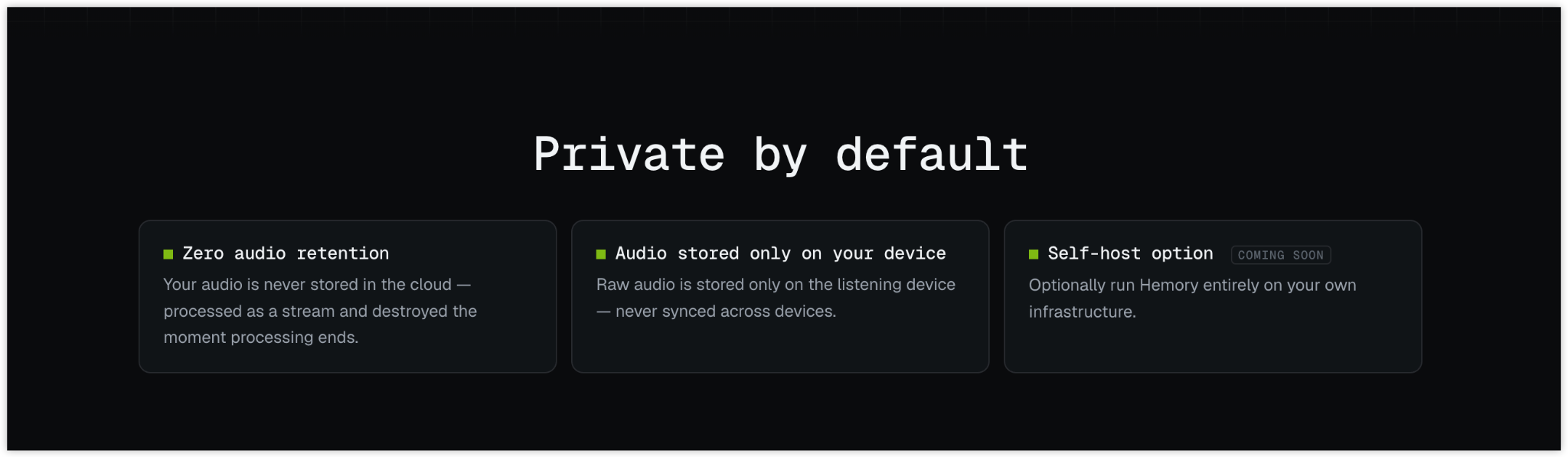
Privacy cards present claims about audio storage and retention.
5. Compare candidates with a small, consistent checklist
Use one row per app. Mark each item confirmed, observed in your own evaluation, or unanswered. “Observed” describes your evaluation only; it is not a general product claim. This makes missing information visible without turning an unclear feature into a pass.
| Decision question | Candidate A | Candidate B | Candidate C |
|---|---|---|---|
| Captures my main conversation sources on devices I use | |||
| I understand how listening starts, stops, and handles interruptions | |||
| Transcripts preserve the details my tasks depend on | |||
| Summaries and organization make records easy to interpret | |||
| Retrieval works for my real questions across the scope I need | |||
| I can inspect source material when an answer matters | |||
| Audio, transcript, summary, and speaker-data policies are clear enough | |||
| Retention, deletion, export, and sharing controls meet my needs | |||
| The current platform and capture method fit my routine |
Choose based on the requirements that matter most to you. If a candidate performs well on capture and search but leaves a critical privacy question unanswered, it is not yet a clear fit. If your main need is simple recall, you may not need extensive AI drafting features. If you want conversation context available to an AI agent, separately verify which data the connection can access and what the external agent does with it.
Where Hemory may fit
Hemory may be worth evaluating if you want to capture real-world conversations on a supported device, keep transcripts and activity-based summaries, and retrieve details later through built-in Q&A. The practical benefit is that you can focus on participating instead of trying to write down every potentially useful detail, then search captured conversations when a later task calls for them.
That fit depends on your needs: the conversation must have been captured, the relevant record must be accessible, and the platform must work for you. For an AI-assisted workflow, distinguish Hemory’s capture and retrieval from an external agent’s reasoning or drafting, and review the result yourself. Use the privacy checklist above to resolve data-lifecycle questions that affect your decision; do not infer answers from the raw-audio statement alone.
FAQ
Does a searchable transcript mean an app has useful memory?
Not necessarily. Search can locate words or passages, while useful retrieval may also need to connect context, conditions, or details across conversations. Test the questions you expect to ask and check whether you can inspect the supporting material.
Should I choose the app with the most automatic capture?
Only if its capture sources, controls, and privacy practices fit your routine. More automation is not useful if it misses the conversations you care about or leaves you unclear about when recording is active.
Does on-device audio storage mean all my data stays on my device?
No. Audio, transcripts, summaries, and speaker information can have different processing and storage arrangements. Check each data type in the current product documentation.
What if a candidate does not explain retention or deletion?
Treat that as an unanswered selection criterion. Ask the provider or consult current documentation, and avoid storing sensitive conversations until you understand whether the available controls meet your requirements.
Choose by the work you need the app to do
A personal memory app should fit the conversations you can capture, the details you need to retrieve, and the level of data control you require. Compare candidates using the same questions, test retrieval with realistic examples, and keep unanswered privacy details visible. If you evaluate Hemory, include its currently supported platforms and distinguish its raw-audio statement from what remains undocumented about transcripts and Memory.