

 Hemory Team
On this page
A conversation capture tool may leave you with a recording, a transcript, a summary, or several of these. Those outputs are not interchangeable: one supports listening back, another helps locate details, and a third gives you a short account of what happened. The right choice depends on what you need to do after the conversation.
TL;DR
- Choose audio when listening back to the original recording matters; check where it is stored and whether you can access it later.
- Choose transcripts when you need to search wording or retrieve specific details. Treat them as records of speech, not guaranteed perfect accounts.
- Use summaries for quick orientation, but retain access to underlying material when conditions, attribution, or exact wording could affect a decision.
- Check whether outputs can be retrieved or used in your later workflow. A transcript or summary that cannot reach the task may still leave you doing manual transfer.
Start with the work you need to do later
Write down the next task before comparing tools. Are you trying to replay an exchange, find a particular detail, prepare a brief, or give an AI assistant relevant background? The answer determines which outputs matter.
| Later task | Output that can help | What to check |
|---|---|---|
| Listen again to wording, tone, or an unclear moment | Raw audio | Whether audio is captured, where it is stored, how long it remains available, and whether you can play or export it |
| Find a date, statement, or detail across conversations | Searchable transcript or conversation records | What can be searched, how records are organized, and whether the result lets you review the surrounding exchange |
| Get a quick overview before taking action | Summary | Which details it includes, how it handles decisions and action items, and whether you can return to the source when needed |
| Draft work using relevant past discussions | Accessible transcript, Memory, or other context | Whether the material can be retrieved for the task, what the connected tool can access, and what you must review or supply yourself |
A tool may produce more than one output. Compare each output separately rather than treating a product label such as “AI notes” as a complete description of what you receive.
Distinguish the outputs
Raw audio: useful for listening back
A recording can let you revisit speech directly. It may be useful when wording or an unclear passage matters, but audio alone can be difficult to search and may require listening through parts that are not relevant.
Check the practical details: Is audio retained? Where is it stored? Can you play it again on the device, access it elsewhere, or export it? Do not assume that a tool offering transcripts also keeps a replayable recording.
Hemory’s stated audio policy is that raw audio is stored only on the listening device and is not synced or stored in the cloud. That statement applies to raw audio; it does not establish the storage or syncing behavior of transcripts or structured Memory. If cloud access, retention, or export matters to your choice, assess those data types separately.
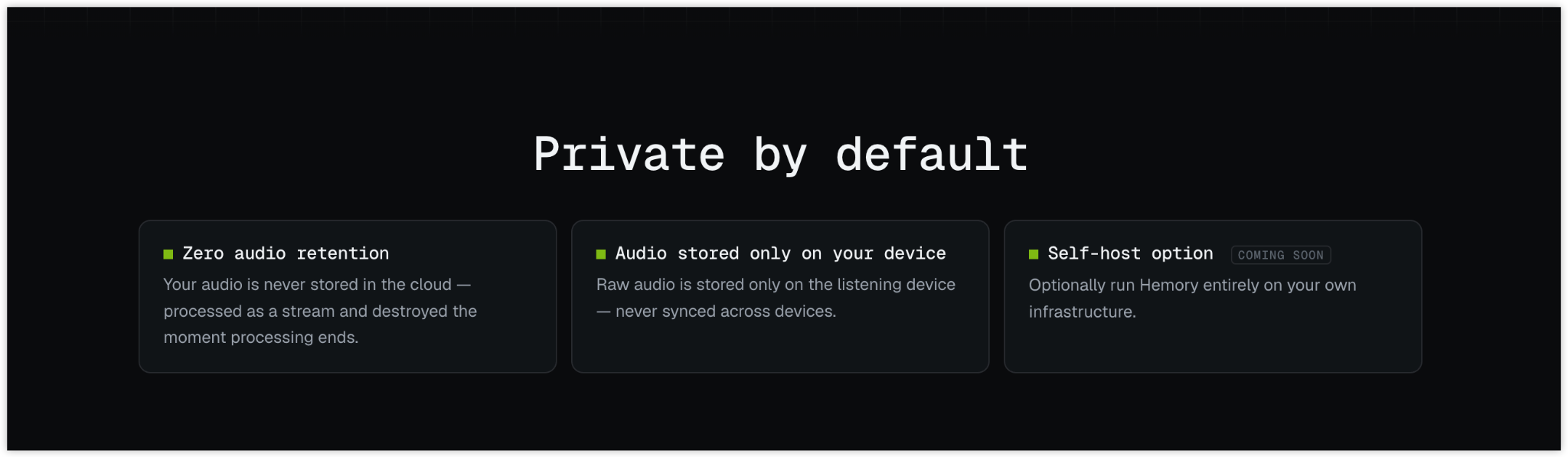
Privacy cards present claims about audio storage and retention.
Transcripts: useful for locating details
A transcript turns speech into text that can be read and, where supported, searched. It can make it easier to find a phrase or follow a discussion without replaying an entire recording. Transcription and speaker labeling can still be imperfect, so review consequential wording and attribution before relying on them.
Ask what the tool actually gives you: a full transcript, selected excerpts, or text embedded in a summary? Can you search across one conversation or multiple sessions? Can you open the surrounding lines or listen to a corresponding section? These distinctions affect whether a search result is useful for your next task.
Hemory’s Features page describes each listening session as producing a timestamped transcript with Speaker labels and AI cleanup. It also describes transcript-line playback on the listening device. These are transcript and playback details; they should not be read as a guarantee of perfect transcription or as a statement that transcripts are stored in the same way as raw audio.

Find individual statements in a searchable transcript.
Summaries: useful for orientation
A summary condenses a conversation so you can get oriented quickly. Its value depends on whether it preserves the information your later work needs. A short recap may be enough for a routine update; decisions, conditions, unresolved questions, and who agreed to what may need more detail or a path back to the source.
Check whether summaries are created for every kind of conversation or vary by activity. Hemory’s Features page describes activity-based summaries: meetings may receive structured notes with agenda, decisions, and action items, while lighter activities receive lighter summaries. Do not assume that every captured conversation becomes a formal meeting record.

See how a meeting summary highlights decisions and follow-ups.
A summary is an aid to review, not proof that every relevant point was captured. If an omitted condition could change a decision, return to accessible source material or ask a focused follow-up question.
Check how outputs support the next step
A useful output has to be accessible where the work happens. For each tool, trace one realistic task from capture to use:
- Name the task. For example, prepare a project update using decisions and open questions from earlier discussions.
- Identify the needed evidence. A summary might orient you, while transcript details may help distinguish a proposal from an accepted decision.
- Find out how you retrieve it. Check whether search works across the records you need, and whether you can inspect the relevant material rather than relying on a short result alone.
- Check the handoff. Can you use the result in your document or AI workflow, or will you need to copy, summarize, and re-enter it manually?
- Review the result. Confirm consequential wording, conditions, current status, and attribution before sharing or acting on a draft.
For an AI workflow, distinguish context access from analysis. A capture tool may organize or retrieve conversation material, while a connected AI agent performs its own reasoning and drafting. The user still supplies current goals and new information, checks the output, and decides what to use. Confirm the access and permissions of the specific connection rather than assuming every agent can search the same records or take external actions.
Compare tools with the same questions
Use a short comparison sheet so that product descriptions do not blur different capabilities:
| Question | Why it matters |
|---|---|
| What is produced after a conversation: audio, transcript, summary, or a combination? | Product labels can hide meaningful differences in the actual output. |
| Which outputs are retained, and where? | Storage and availability may differ between audio and text. |
| Can you search one record or retrieve details across sessions? | A transcript is not automatically searchable across a collection. |
| Can you inspect the source around a result? | Context helps you assess wording, conditions, and attribution. |
| Can you use the material in your later task or AI workflow? | Otherwise, manual copying and retelling may remain part of the process. |
| What needs human review? | Transcription, summaries, and AI-generated work should not be treated as infallible. |
Use the answers to identify a fit, not to manufacture a universal winner. If playback is essential, prioritize confirmed audio access and retention. If finding details is the main job, prioritize practical search and access to surrounding context. If you mostly need a quick recap, assess summary structure and whether you can inspect source material when a detail matters.
Where Hemory fits
Hemory is relevant when you want captured conversations to support later retrieval, not only to produce a recording or a one-time recap. Its Features page describes timestamped transcripts with Speaker labels and AI cleanup, activity-based summaries, and a built-in Q&A Agent for asking questions about your Memory. The page describes multi-turn transcript-based Q&A and retrieval across conversation sessions.

Retrieve past commitments and draft follow-up tasks.
This can reduce the need to reconstruct every discussion from personal notes before asking a question about captured material. It does not recover an exchange that was never captured, guarantee that every detail appears in a result, or remove the need to review consequential answers. When an external agent is involved, its access and analysis depend on the supported connection and the agent itself.
Keep the audio distinction clear when comparing Hemory with another option: its stated raw-audio policy is device-local and does not sync or store raw audio in the cloud. Do not extend that statement to transcripts or Memory. If your decision depends on exporting audio or on a particular transcript or Memory retention behavior, confirm those specifics before choosing.
Make the choice against your real task
Select the smallest set of outputs that supports the work you actually do. If replay matters, verify audio access. If search matters, test how you can locate and inspect details. If later AI work matters, confirm that relevant captured context can reach the specific workflow and that you can review the resulting draft.
Then try the comparison against one ordinary task rather than an imagined all-purpose use case. The best fit is the tool whose documented outputs and access rules match that task, without leaving an unacceptable gap in playback, retrieval, or review.
FAQ
Is a transcript the same as a summary?
No. A transcript represents speech as text; a summary condenses selected information. A summary is quicker to scan, while a transcript may help locate details, but neither guarantees a complete or error-free account.
Does every transcription tool let me replay the original audio?
Not necessarily. Check audio retention and playback separately from transcript availability. A tool may provide text without making a recording available for later playback.
Can I use a summary alone for an important decision?
Use it for orientation, then review relevant source material when wording, conditions, attribution, or current status could change the decision. A summary does not establish that every important detail was included.
Does Hemory store raw audio in the cloud?
Hemory’s stated policy is that raw audio is stored only on the listening device and is not synced or stored in the cloud. That statement is specific to raw audio; check transcript and Memory handling separately if those details affect your choice.