

 Hemory Team
On this page
A shared conversation store can spare you from re-entering useful background in every AI tool. But connecting multiple agents does not, by itself, tell you what information they can see, what they can change, or where stored data lives. Use the checklist below to compare a central store with separate tools, and to identify what you need a provider to clarify before connecting sensitive material.
TL;DR
- Compare the actual data types—not just the word “memory”—and find out where each is stored, processed, retained, and deleted.
- Check access and permissions separately for every agent connection. A shared source does not mean shared agent histories or identical access.
- Try the connection with a low-risk, previously captured detail. Confirm what the agent can retrieve and whether any write or external-action permissions are in scope.
- Hemory’s public materials describe raw audio as device-local and document MCP-based Memory retrieval and Speaker management. They do not settle every connected client’s access scope or where transcripts and structured Memory are stored.
Decide whether one store or separate tools fit the work
A central memory store can make captured conversation context available to multiple connected agents, reducing repeated searching, summarizing, and retelling. Separate tools may be a better fit when teams need different access boundaries, data-handling terms, or workflows that a single store cannot meet.
The trade-off is not simply convenience versus security. It is whether the store preserves the information you need and whether each connection exposes only the access and actions you intend. Connecting agents to one source does not make their private chat histories, tools, or execution state shared.
| Approach | May fit when | Questions to resolve |
|---|---|---|
| One memory store connected to several agents | The same captured conversation context is useful across workflows, and each client’s access can be reviewed. | What can each client retrieve or change? Are its permissions and scope suitable for the data? |
| Separate stores or tools | Different work requires distinct data boundaries, retention terms, or access rules. | Will people have to copy, summarize, or reconcile context between tools? |
Choose based on the real tasks and data involved. If separate systems already contain useful records, a central memory store is not automatically necessary. If it would reduce repeated context preparation, make sure its access and data-handling boundaries meet your requirements first.
Use this checklist before connecting agents
1. List the information the store actually contains
Ask what the product captures and creates. Raw audio, transcripts, summaries, structured Memory, and connection logs are different data types; do not assume they share the same storage location, retention period, or deletion behavior.
For each type that matters to your work, ask:
- Is it stored locally, in the cloud, or in both places?
- Where is it processed, and is it synced across devices?
- How long is it retained, and what happens when you delete it?
- Can connected agents retrieve it, or only selected summaries or records?
- Are connection activity, prompts, or retrieved content logged elsewhere?
Treat unanswered questions as open requirements, not as evidence that the product either does or does not have a particular capability.
2. Check every agent connection separately
A vendor’s general statement that it supports an integration does not establish the behavior of every client. Confirm that the specific client and connection route you plan to use are supported, and check its setup instructions and permission details.
Make a short access table before connecting sensitive records:
| Connection | What it needs to retrieve | What it can change or trigger | Evidence to confirm |
|---|---|---|---|
| Agent A | Relevant captured conversations or selected records | Memory edits, if any; external actions, if any | Current client instructions and documented permissions |
| Agent B | The context needed for its own task | Memory edits, if any; external actions, if any | Its own connection setup and permission details |
Do not infer that two agents have the same archive scope or permissions because they connect to the same store. Also distinguish the store’s access from the agent’s own abilities: the external agent performs its reasoning and any supported actions, while the user remains responsible for reviewing consequential work.
3. Confirm the read and write boundaries
Ask what the connection can retrieve and what it can modify. “Read-only” may not describe every capability, and a documented action for one type of data does not imply permission to change all stored records. Similarly, connecting a memory source does not grant permission to send messages or update other systems.
For a low-risk check, use a previously captured detail that you can recognize. Ask the connected agent a specific question about it, then compare the answer with the accessible record. Note whether the answer is scoped correctly and whether the connection reveals more than the task requires. If you need to assess write permissions, use a safe test environment and the provider’s documented controls; do not test by changing live records or triggering real external actions.
A missed result is not proof that the conversation was never captured. Access, search scope, and the wording of the request can all affect what appears. Resolve those possibilities before relying on the result.
4. Check that data handling matches your obligations
Use the product’s current documentation and terms to assess whether the store is appropriate for the conversations you want to capture. Consider the sensitivity of the material, who needs access, retention and deletion requirements, and any rules that apply to your work. If a material point is unclear, ask the provider for a specific answer before connecting that data.
Be careful with broad labels such as “private,” “local,” or “secure.” Ask which data type the statement covers and what it says about processing, sync, access, and deletion. A statement about raw audio does not settle how transcripts or structured Memory are handled.
What Hemory’s public materials document
Hemory’s homepage states that raw audio is stored only on the listening device and is not synced across devices. That statement is specifically about raw audio; it does not establish where transcripts or structured Memory are stored or how all data is processed.
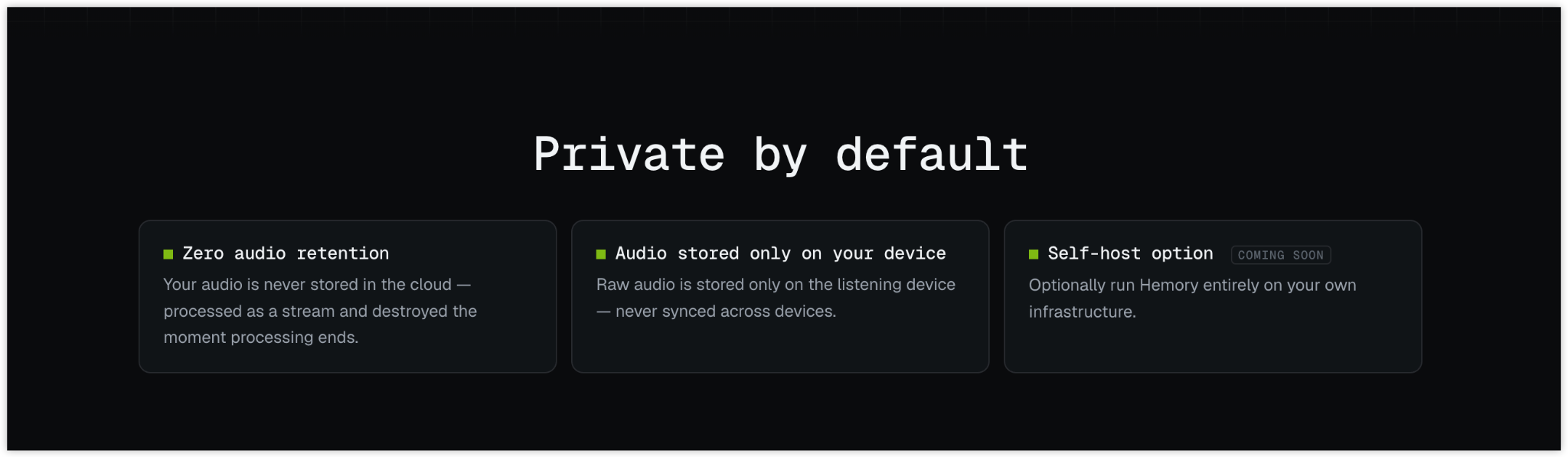
Privacy cards present claims about audio storage and retention.
Hemory’s public product information describes Memory retrieval through MCP, and the Changelog documents Speaker labeling and management via MCP. Those documented capabilities do not establish identical archive scope or permissions for every connected agent. Publicly listing an agent client also does not, by itself, verify every client’s setup and behavior.

Review MCP connection options and access settings.
So evaluate Hemory with the same questions as any candidate store: confirm the data-handling details that matter to you, then check the intended client’s connection steps and permissions. If transcript or Memory storage, a client’s access scope, or a required permission remains unclear, treat that as an unresolved decision point rather than assuming the answer.
Make the decision against your requirements
Before connecting multiple agents, write down the task the shared context should support and the minimum access each agent needs. Proceed when the relevant data types, storage and retention terms, client-specific access, and permitted actions are clear enough for your use. Choose separate tools—or defer connecting sensitive records—if a material requirement remains unresolved.
A shared store can reduce repeated context preparation, but it does not remove the need to review what an agent retrieves or produces. Start with a low-risk, previously captured conversation and one specific task; expand only when the result and access boundaries meet your requirements.
FAQ
Does connecting two agents to one memory store share their chat histories?
No. Access to a shared source does not mean agents share their private chat histories, tools, or execution state. Check what each connection can retrieve from the store itself.
Does device-local raw audio mean transcripts and Memory are local too?
Not necessarily. A statement about raw audio does not establish where transcripts or structured Memory are stored. Check each data type separately.
If an agent cannot find a conversation, does that mean it was never captured?
No. The record may be outside that connection’s access scope, or the query may not locate it. Check the available source and connection details before drawing a conclusion.
Should every agent get the same permissions?
Only if the work calls for it and the access is appropriate. Give each connection the scope it needs, and confirm its actual permissions from current, client-specific documentation.