

 Hemory Team
On this page
An AI agent may need the reason behind an earlier decision, but that detail might not be in the current chat or the brief you just wrote. MCP gives a connected AI client a way to request relevant Memory from a server such as Hemory. The server supplies accessible conversation context; the agent—not MCP itself—uses that context to answer, analyze, or draft.
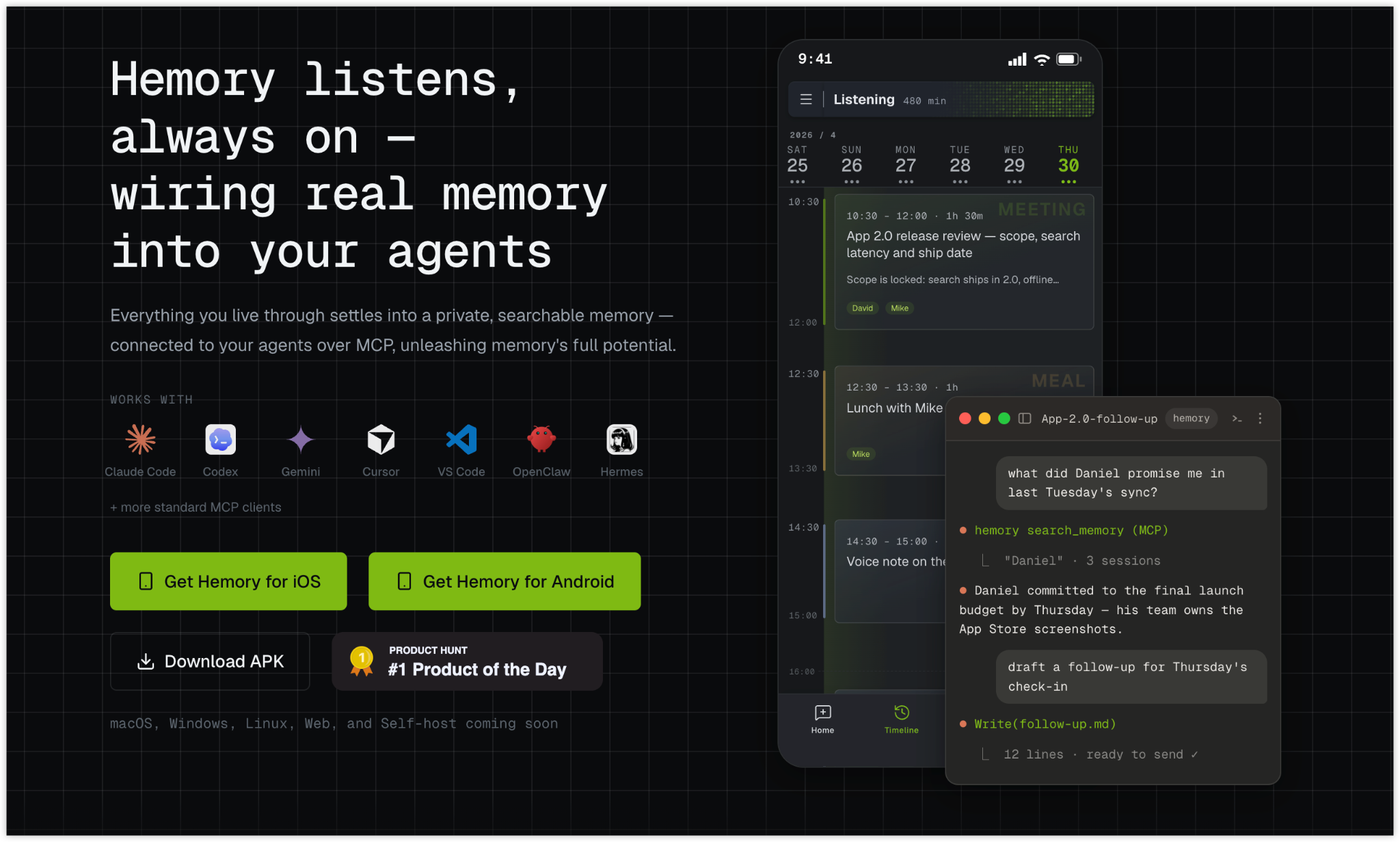
Bring past conversations into AI workflows with searchable memory.
TL;DR
- The agent starts with your current task and can call an MCP search tool to retrieve relevant, previously captured conversation Memory.
- Hemory provides the retrieval and context; the connected client mediates the tool call, and its AI agent does the reasoning.
- Search can only return information that was captured and is accessible to that connection. It does not guarantee complete recall or replace your review.
What does MCP memory search mean?
MCP, or Model Context Protocol, is a way for an AI client to connect to tools provided by an external server. In this case, the server makes Memory retrieval available to a connected client. Rather than asking you to copy a long conversation history into the chat, the agent can request relevant material while working on your task.
It helps to separate three things:
| Part | What it does |
|---|---|
| MCP client | Connects to the server and handles the tool interaction. The exact setup and behavior depend on the client. |
| Hemory MCP server | Provides access to documented Hemory capabilities, including Memory retrieval. |
| AI agent | Interprets the task and retrieved material, then reasons or drafts an answer. |
Hemory’s Features page demonstrates a search_memory capability. That example helps explain the idea, but it does not define every client’s exact connection process, search parameters, result format, or access scope.
How does a search move from a task to an answer?
A typical interaction follows this sequence:
- You give the agent a current task. For example: “Summarize the reasoning behind the onboarding change, and identify what still needs confirmation.” The task tells the agent what context would be useful.
- The agent decides whether it needs earlier context. If the answer depends on past conversations, the client can make an MCP tool available to the agent.
- The agent calls the search tool. It sends a request to retrieve Memory relevant to the task. The exact request fields and search behavior depend on the documented tool and client; they should not be assumed from the word “MCP.”
- The server returns accessible results. With Hemory, the agent can retrieve relevant information from conversations that were captured and are available through the connection. A search cannot recover an exchange that was never recorded or that the connection cannot access.
- The agent uses the results. The external agent interprets the retrieved context alongside your current instructions and produces an answer or draft. MCP provides the tool connection; it does not do the agent’s reasoning for it.
- You review what matters. Check consequential details such as who agreed to a decision, whether a condition still applies, and whether a later conversation changed the current status. A past mention alone does not prove that something was approved or completed.
For example, when preparing a project update, you might ask a connected agent to retrieve earlier discussions about a launch decision and draft a short explanation. The agent can use the retrieved context to form its draft, but you still need to supply current information—such as the reporting period or the audience—and review whether the draft reflects the team’s current position.

Retrieve past commitments and draft follow-up tasks.
What does Hemory contribute?
Hemory captures and organizes real-world conversations so that relevant Memory can be retrieved later. When a discussion has already been captured and is accessible through a supported connection, an agent can use that context without requiring you to reconstruct the whole exchange from memory or manually prepare a complete chronology first.
That can reduce repeated note-taking, searching, summarizing, and retelling. It also lets you pay attention to the conversation instead of trying to record every detail that might become useful. The later result still depends on the available Memory, the task you give the agent, and your judgment about its answer.
Hemory’s built-in Q&A Agent is a separate way to ask questions about your Memory. A connected external agent uses MCP through its client, and its behavior and access may differ. Hemory documents Memory retrieval through MCP and Speaker labeling and management via MCP; that does not establish general permission to edit all Memory or take arbitrary actions in other services.
What are the limits of MCP conversation search?
- It is not access to uncaptured conversations. If an important exchange was not recorded, use another source or ask someone who can clarify it.
- It is not a guarantee that every relevant detail will be found. The search and accessible material have limits, and exact behavior can vary by client.
- It is not shared agent memory. Connecting a client to Hemory does not mean it can access every conversation, every client’s private chat history, or every external system.
- It is not the same as automatic action. Retrieval provides context. The agent’s ability to draft or act depends on its own supported capabilities and permissions; MCP access to Hemory does not authorize arbitrary external actions.
- It is not proof that a result is current or agreed. Retrieved conversation content is evidence of what was captured, not automatic confirmation of the team’s present decision.
FAQ
Does an MCP search tool search the agent’s own chat history?
Not necessarily. In this example, the MCP tool retrieves relevant Memory from Hemory. That is distinct from the agent’s private chat history or internal memory, which MCP does not automatically share.
Does the agent read every conversation in Hemory?
Do not assume that. The agent can retrieve only information available through the connection and supported tools. Exact scope depends on the connection and client; a search result is not a guarantee of a complete archive-wide review.
Does MCP search guarantee that the agent remembers everything relevant?
No. It can help the agent retrieve captured context, but it cannot recover uncaptured discussions or guarantee that every relevant detail appears in the results. Review important claims against the available records and current information.
What should I provide to the agent?
Give it the current goal and any new information that affects the answer, such as the audience, timeframe, or required format. You generally do not need to rewrite the entire conversation history first, but you should review the result before relying on it.
The practical takeaway
Think of MCP memory search as a route for an agent to request relevant context—not as a promise that it can see everything or act on your behalf. Hemory can preserve and retrieve captured conversations; the connected agent uses what it can access to reason or draft. You set the task, add current information, and decide whether the result is accurate and useful.