

 Hemory Team
On this page
A planning task can depend on a discussion you had last week, but you may not remember every decision, constraint, or open question. If that meeting was captured in Hemory and is accessible through a supported connection, a connected AI agent can retrieve relevant context while helping with the new task. You provide today’s goal and review the result; you do not need to retell the entire meeting from memory.
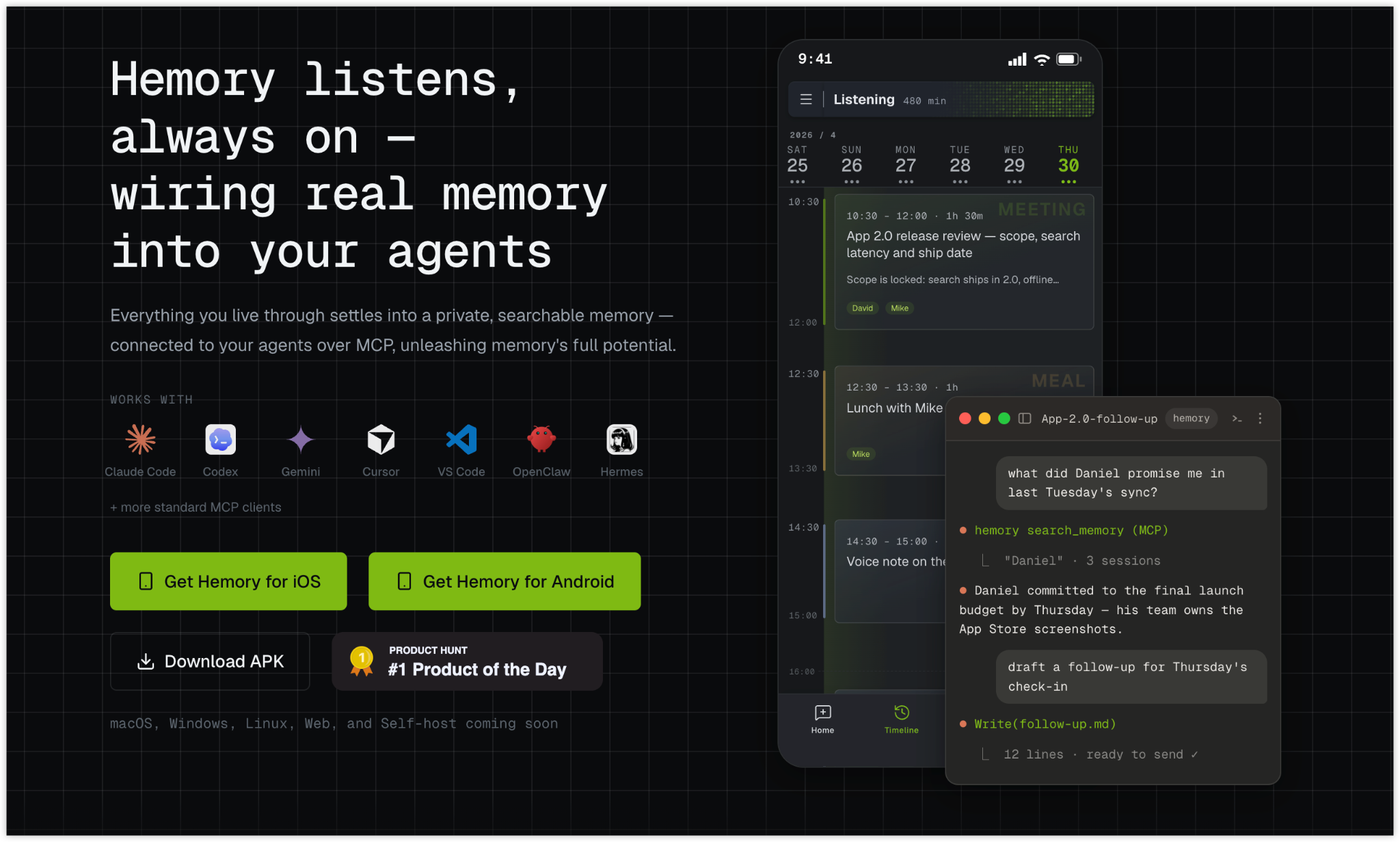
Bring past conversations into AI workflows with searchable memory.
TL;DR
- This workflow applies only to meeting context that was previously captured and is accessible to the connected agent.
- State the planning task and what the past meeting should clarify. Let the agent retrieve relevant background rather than preparing a complete manual recap first.
- Review the retrieved points and draft for scope, conditions, current status, and missing information. A past discussion does not establish what has happened since.
1. Confirm the meeting context is available
Before relying on an agent, make sure the relevant meeting was captured in Hemory and that the connected route can access the needed Memory. Hemory organizes captured conversations; it cannot reconstruct a meeting that was never recorded. A supported connection also does not guarantee that every agent has identical access or retrieval behavior.
If the meeting was not captured or cannot be accessed, use another available record or ask a focused question of someone who was there. A short note or your own recollection can help, but distinguish what it says from what the meeting itself established.
Hemory can create timestamped transcripts and meeting-oriented structured notes, including topics, decisions, and action items. These records can reduce the amount you need to select and retype before planning. They are useful context, not a guarantee that every detail was captured or that every statement is current.

See how a meeting summary highlights decisions and follow-ups.
2. Give the agent today’s goal and the reason for retrieving the meeting
Start with the decision or plan you need now. Add the specific question the earlier discussion might answer, plus any current information the meeting could not contain. This helps the agent look for relevant context rather than produce a broad recap.
For example, a request might say:
Help me plan the next phase of this project. Use the relevant meeting context already accessible through Hemory to identify decisions, constraints, unresolved questions, and any stated next steps that affect the plan. Separate what the meeting established from anything that may have changed since. I’ll provide current updates below. Draft a plan with assumptions and open questions clearly marked; don’t invent owners, deadlines, approvals, or progress.
Current updates: [add new information, or say that you have none]
You do not need to prepare a full timeline or quote log first. If you already know a useful clue—such as the project name, approximate meeting date, or topic—include it. If not, describe the work the meeting concerned and let the available results help clarify which discussion is relevant.
3. Let the agent connect past outcomes to the new task
The agent should use accessible meeting context to identify what matters to the plan, then reason and draft according to its own capabilities. Hemory provides the captured Memory and context access; it does not itself decide what the project should do next or update an external planning system for you.
A useful planning draft separates different kinds of information:
| What the agent finds | How to use it in the plan |
|---|---|
| An accepted decision | Treat it as established within the decision’s stated scope. Check whether later information changed it. |
| A proposal or unresolved question | Keep it open; do not present it as an agreed direction. |
| A constraint or condition | Show how it affects the plan and whether the condition still applies. |
| A stated commitment or next step | Preserve the commitment, but do not assume it was completed. |
| A missing or unclear detail | Mark the gap and ask for clarification if it changes the plan. |
For instance, a meeting may record that a launch depends on a review. That does not show whether the review happened afterward. The new plan should preserve the dependency and ask for the current status if it matters, rather than treating the past discussion as a progress update.
4. Review what the agent retrieved and drafted
Check the parts that could change your next action:
- Relevance: Is this the meeting and project you meant? Similar names or topics do not prove the same scope.
- Meaning: Are decisions, proposals, conditions, and open questions kept distinct?
- Currency: Does the plan separate historical outcomes from new information and current status?
- Responsibility: Is an owner or deadline actually stated, or has the draft filled in a blank without support?
- Coverage: Is a key issue missing, or is the agent treating a partial record as the whole story?
You do not need to recheck every line by default. Focus on ambiguities or omissions that could alter the plan. If a point is uncertain, ask a targeted follow-up or provide the missing current information. If the relevant discussion is not available through the connection, use another source rather than assuming the absence of a result means no decision was made.
Once the plan is sound, carry it into your usual planning process. The agent’s draft is work for you to review, not evidence that a teammate approved it or that an external task was created.
If a connected agent cannot retrieve the meeting
You can use Hemory’s built-in Q&A to ask about your Memory, then provide a relevant answer to an assistant that cannot access the connected context. The Q&A Agent supports multi-turn transcript-based questions and can retrieve across sessions, but its scope and permissions should not be assumed to match every external connection. Keep the task-critical details in the prompt or planning document so the assistant receiving them has the context it needs.

Retrieve past commitments and draft follow-up tasks.
FAQ
Does the agent need a meeting summary from me first?
Not necessarily. If the meeting was captured and the connected agent can access the relevant context, state your current task and let it retrieve what is useful. Add current information or a clue when needed; do not write a complete recap just to get started.
Can the agent tell me what happened after the meeting?
Only if that later information is also available to it or you provide it. A past meeting record can show what was discussed, not whether a commitment was later completed or a plan is still current.
What if I remember the topic but not the date or exact wording?
Describe the project or question in ordinary terms and provide any clue you do remember. Retrieved results may help clarify which conversation is relevant. Do not treat an unsuccessful search as proof that the meeting was never captured or that no decision was made.
Turn the retrieved context into a plan you can use
Start with one real planning task and the meeting context most likely to affect it. A supported connection can reduce the work of reconstructing and re-entering a discussion, while Hemory preserves and organizes captured material for later use. Supply what is new, review what the agent returns, and keep unresolved points visible before acting.